
RH2017 - Indigo screen layout - Responsive HTML5 - Layout Customization
Hello,
I'm interested in using the Indigo layout in RH2017 for a new online Help Centre. I am using an EVAL version of RH2017 with the latest update on a test PC (downloaded yesterday).
The layout looks good and it can be modified quite a bit, but it will take a bit of learning to understand it well enough before I decide to use it. However, it does seem to have issues even with using the latest update. But it may be down to my understanding.
I've noticed a couple of things so far (both happen in the out of the box Indigo and my own modified Indigo).
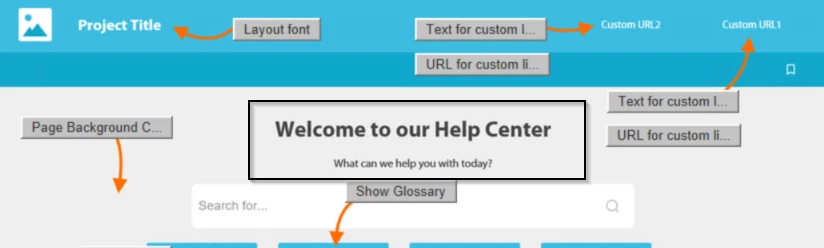
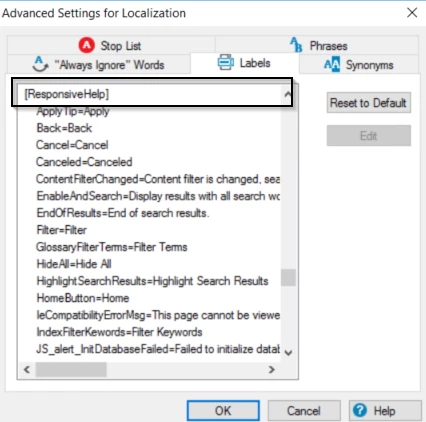
1. The 'Welcome to our Help Center title and What can we do to help you sub title is missing. They just dont appear at all. I have checked the Project Settings screen - Advanced button and the Labels tab (as I read on another discussion that this is where the words can be changed) and those options are not in the list at all. Perhaps this points to the problem, I don't know.
This is the relevant HTML for the homepage, so the "@KEY_LNG.Welcome_header" and "@KEY_LNG.Welcome_text" need populating from somewhere, I would imagine.
<div class="frontpage-welcome">
<h1 data-html="@KEY_LNG.Welcome_header"></h1>
<p data-html="@KEY_LNG.Welcome_text" data-if="@KEY_SCREEN_DESKTOP" data-attr="aria-hidden: !@KEY_SCREEN_DESKTOP"></p>
</div>
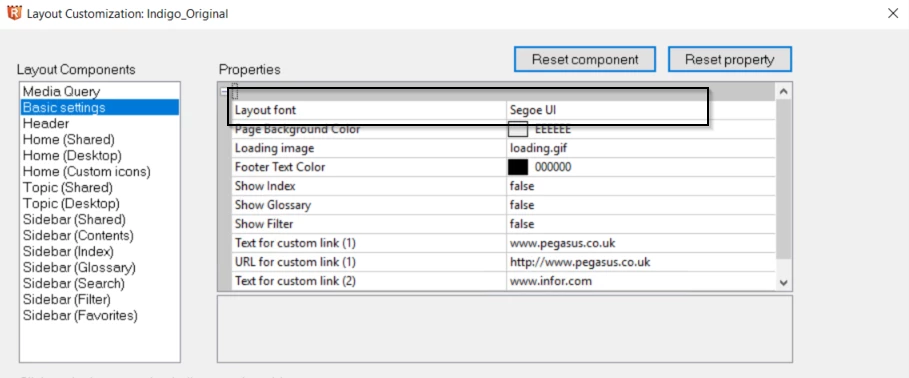
2. I have worked out that the layout font can be changed for the layout, but that doesnt change the font used in the topics. They are set to Times New Roman and I cant work out how to change the style.
There are other small concerns but these are the two major ones at the moment.
Does anyone have any ideas?
Thanks,
David.


 AdChoices