
RH2017 Responsive HTML5 Search Issue w/ Conditional Text
Hello,
I am using Conditional Text throughout my project to generate 2 versions of the document. I have conditions set on text within topics as well as conditions set on the topic level.
When I generate my 2 Responsive HTML5 versions, at first, everything looks fine - the text within the topics is correctly generated and TOC is displaying the correct topics. However, when I do a search in one version, I'm seeing hits from topics from the OTHER version, which is not exactly the desired experience. Plus, the breadcrumbs that appear below it makes the search look messy (see attached image - as you can see, I am suppressing the Context line because I felt it was just too wordy for the search panel).
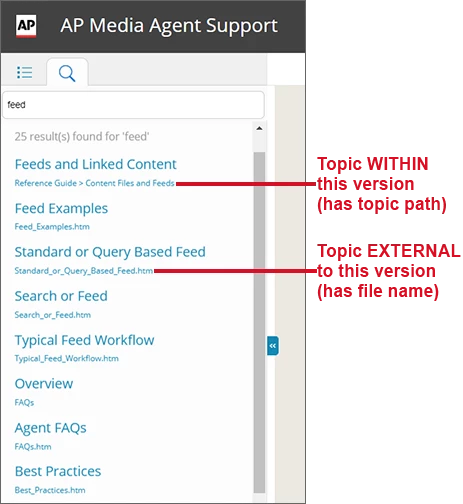
I have tried the "Exclude this topic from search" option in "Topic Properties," but this is just not practical to maintain w/ the number of files (and me forgetting that I need to turn OFF that setting, etc.). I just don't understand why the Conditional Text is NOT being respected here for searching.
I am using:
- RH2017 - all patched up / latest screen layout versions
- Windows 7
- Conditional Text (within topics and
- Generating R-HTML5 / Azure Blue Screen Layout
- Using two separate TOCs; both w/ Conditionalized Topics within (they share many topics, but some topics ONLY apply to one version, and vice versa)
- In the R-HTML5 Settings, I have both "Exclude Unreferenced Topics from Output" and "Exclude Unreferenced Baggage Files from Search" SELECTED
I don't see any other options to enable/disable that control the search results.
If there is a way to suppress the filename/path, I'd like to know that too! 
Thank you in advance for any assistance you have for me.
Tabby W.


 AdChoices