
AntoninMaxSea
Inspiring
March 31, 2020
Question

RH2019 : Error when opening Azure DevOp connection profile

  • March 31, 2020
  • 1 reply
  • 572 views

when opening a profile connection under the collaborate menu I always obtain the following Message Error:
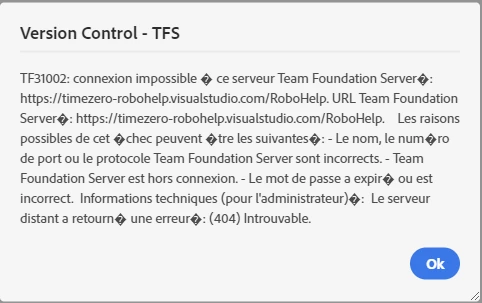
 and when i want to checkin the dialog is also empty ! but the checkin under Visual studio from the workspace to DevOps source control is available ... 

is some one has an idea, this will be  helpful for me ... few weeks ago this profile connection was allright and i didnt change any thing.

MC

This topic has been closed for replies.

1 reply

Community Expert
March 31, 2020

I can only suggest you check with the TFS administrator to see if they've changed anything.


I also found this page for the Microsoft error message listed.

https://docs.microsoft.com/en-us/azure/devops/reference/error/tf31002-unable-connect-tfs?view=azure-devops

AntoninMaxSea
Inspiring
April 2, 2020

Thank you for the answer, i'll check with our network administrator and inform you of following.