

RH2019 How can I create a pop-up information topic
I am a new RH user and little knowledge of HTML.
I want to create a pop-up topic from an existing topic.
I want this to be a custom-sized box.
I do not want a heading on my pop-up - just information.
I have created the topic which will be the pop-up text box and have linked to this topic from the main topic making it a custom-sized pop-up.
I delete the automatic heading created with the topic name - to be replaced with paragraph text. I check the Preview to see the size and look of pop-up is as expected.
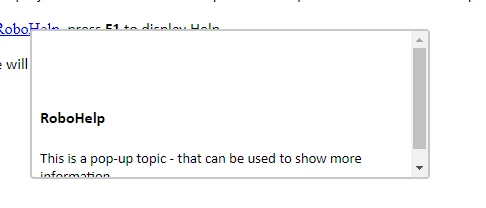
When I publish - there is a blank line at the top of my pop-up and a scroll bar as the box is now too small because RH has included a blank line for the missing heading (h1) – that I deleted.
So I added a smaller heading (h4) to at least have a heading if that is what RH wants – but as soon as I change it from h1 to h4 it puts it in the body not the heading.
When I publish, I still get a blank line at the top of the page then the h4 heading I added.
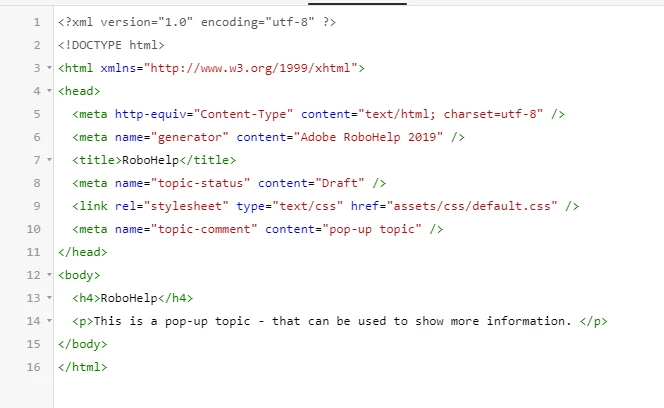
I can see from the Source option that RH still thinks my original h1 heading is there - even though it’s not and it publishes blank (because I removed it from the topic screen). If I remove all the content between <head> and <head> and republish, RH puts back a line after publishing <head><head> with a red cross on the side which says you can't have a <head> line without a <title>.
Now I've re-created it and left all the heading data there and I still get a blank line at the top of the topic as shown above.
How do I make the <title> between the <head>‘s display, as anything other than h1 so I don’t need a separate h4 heading in the <body> (and so I don’t get a blank line)
Is there any way to remove this? Do I have to change something in the css?


 AdChoices