
Toxxyc
Inspiring
August 6, 2019
Answered

RH2019 Indent Issues

  • August 6, 2019
  • 1 reply
  • 638 views

Good afternoon ladies and gents,

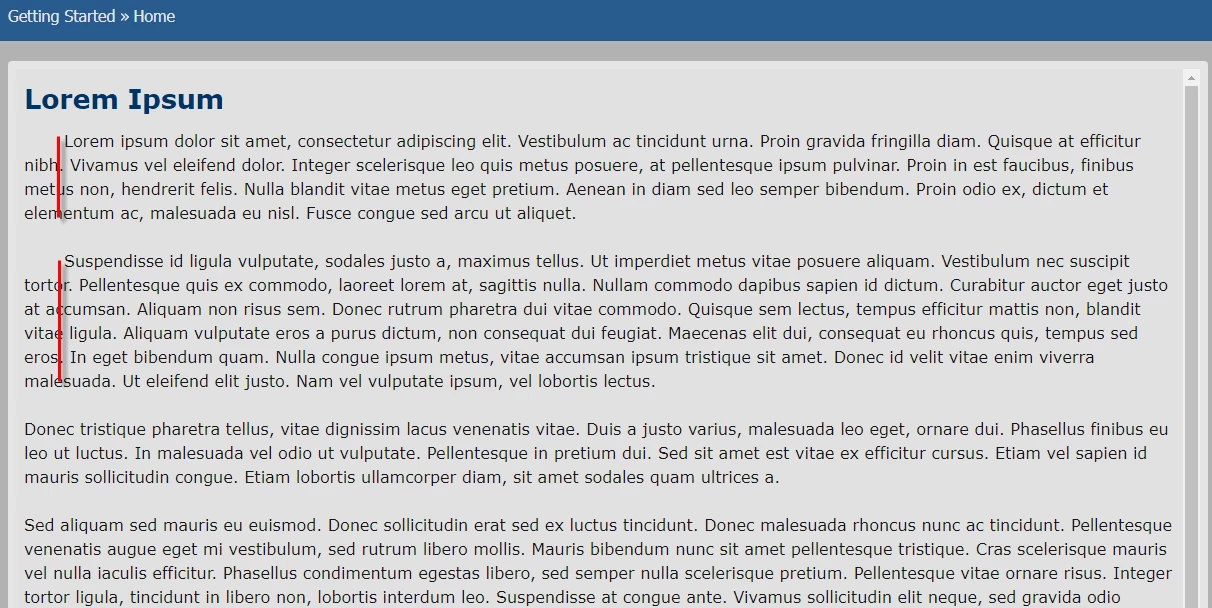
Latest issue I picked up with RH2019, and I'm thinking it should have a simple fix.  The indentation of paragraphs is incomplete.  I want to indent the entire paragraph, but only the first line is indented.  It's not like this on the Classic layout and I assume it's because of a change in how the CSS is handled.  Before I could just select the whole section and hit tab, but now I have to click the Indent button and it's not working like it should.  Just one question:  How do I fix it?  Google isn't helping...

Example of issue:
This topic has been closed for replies.
Correct answer Peter Grainge

If it is for all paragraphs with that style, open the CSS and apply some

left margin. If it is just for selected paragraphs, do that in the

Properties > General tab.

If you regularly use indented and not indented, create a class (new style

based on P) with the required indent.

Peter Grainge

www.grainge.org

@petergrainge

1 reply

Peter Grainge
Community Expert
Peter GraingeCommunity ExpertCorrect answer
Community Expert
August 6, 2019

If it is for all paragraphs with that style, open the CSS and apply some

left margin. If it is just for selected paragraphs, do that in the

Properties > General tab.

If you regularly use indented and not indented, create a class (new style

based on P) with the required indent.

Peter Grainge

www.grainge.org

@petergrainge

Use the menu (bottom right) to mark the Best Answer or Highlight particularly useful replies. Found the answer elsewhere? Share it here.
Toxxyc
ToxxycAuthor
Inspiring
August 6, 2019

I can do the indent, that's not the problem.  I'm just wondering if there's not a way to fix the default indent option.  It seems to create the following on the new layout when I indent a paragraph:

<p><span style="margin-left:40px;">text</span></p>

While on the old (Classic) layout it does:

<p style="margin-left:40px;">text</p>

And the latter works perfectly.  Why does the new layout force a span in there?  If I remove the span in the new layout and just force the style on the paragraph, it works just fine again.  It's quite frustrating...

Peter Grainge
Community Expert
Community Expert
August 6, 2019

Because 2019 is stricter writing code.

What you should be doing is having two styles, one with an indent and one

without.

Peter Grainge

www.grainge.org

@petergrainge

Use the menu (bottom right) to mark the Best Answer or Highlight particularly useful replies. Found the answer elsewhere? Share it here.