Inspiring
June 26, 2020
Answered

RH2019: Is it possible to indent Related Topics List?

  • June 26, 2020
  • 4 replies
  • 325 views

Hi

I would like to know if it is possible to indent the Related Topics List to the right based on a style. I used the Related Topics placeholder and applied a style to the Related Topics list but unfortunately it did not take my style. The deafult style (ol.reltopics-list) for Related Topics in the default.css does work. But the list is indented to the left.

I would like to get an output as below.

Related Topics

  • Topic 1
  • Topic 2
  • Topic 3
    This topic has been closed for replies.
    Correct answer Amebr

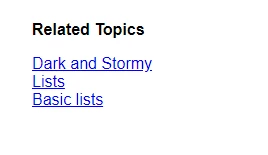
    So you see something like this where the list is left aligned with the list caption:

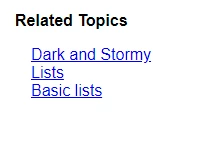
    But want to see something like this where the list is indented from the list caption?

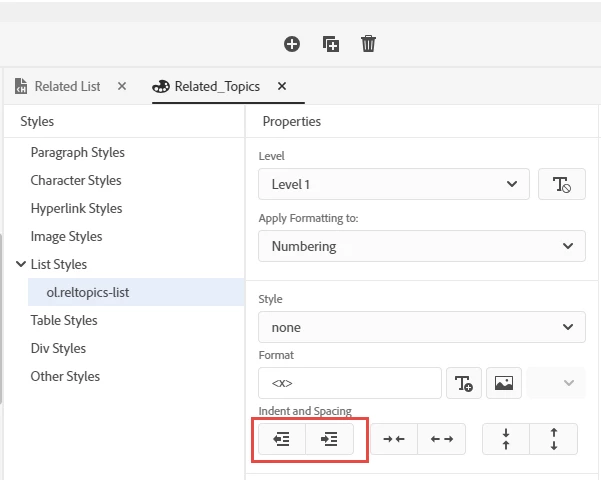
    I accomplished it using the first set of Indent and Outdent buttons on the ol.rhtopic-list style (that was like 4 clicks I think):


    If you want more control than the buttons provide, you'll need to go in to text editor and update the --list-indent value in at least 2 places.


    4 replies

    Inspiring
    June 29, 2020

    Hi Amebr

    It worked. Thank you.

    AmebrCommunity ExpertCorrect answer
    Community Expert
    June 29, 2020

    So you see something like this where the list is left aligned with the list caption:

    But want to see something like this where the list is indented from the list caption?

    I accomplished it using the first set of Indent and Outdent buttons on the ol.rhtopic-list style (that was like 4 clicks I think):


    If you want more control than the buttons provide, you'll need to go in to text editor and update the --list-indent value in at least 2 places.


    Inspiring
    June 29, 2020

    RH2019 Frameless - New UI

    Peter Grainge
    Community Expert
    Community Expert
    June 26, 2020

    You haven't said which version of RoboHelp you are using. 

    • If you are using a Classic version please go to File Help > About and confirm the version shown. If it is 2019 Classic, please add "Classic" when advising the version number.
    • If you are using the New UI, the version number will  be found in Help > About. Please add "New UI" if the version number starts 14.


    Use the menu (bottom right) to mark the Best Answer or Highlight particularly useful replies. Found the answer elsewhere? Share it here.