
Inspiring
October 24, 2019
Question

RH2019 (New): CSS editor for table styles

  • October 24, 2019
  • 6 replies
  • 656 views

Running into issues trying to create a table style that mirrors the table in the image below (in terms of borders and shading) in RoboHelp 2019 (new) using the CSS editor.
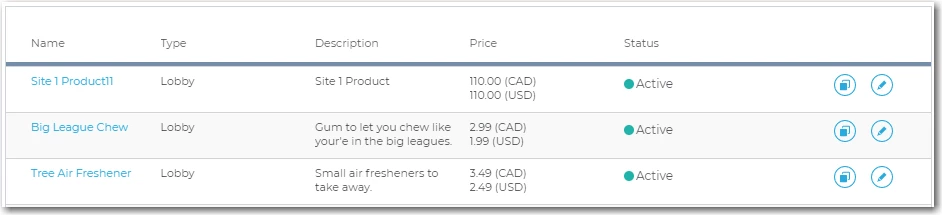


Tried setting up a new table style and configuring it as follows (this is/was dependent on my thinking/assumption that the configuration for FIRST ROW would supercede the configuration for ODD ROWS (that is, just for row #1)):


WHOLE TABLE (Apply formatting to)

GENERAL

Border Collapse: Select (default)

BORDER

Style: Solid

Color: #ced3d8

Width: 1 px

All


FIRST ROW (Apply formatting to)

BORDER

Style: Solid

Color: #738DA8

Width: 4 px

Bottom

BACKGROUND

Shading: <no-color/redline* also tried specifying white, but to no avail>


EVEN ROWS (Apply formatting to)

BORDER

Style: Solid

Color: #ced3d8

Width: 1 px

Bottom + Top

BACKGROUND

Shading: <no-color/redline* also tried specifying white, but to no avail>


ODD ROWS (Apply formatting to)

BORDER

Style: Solid

Color: #738DA8

Width: 4 px

Bottom + Top

BACKGROUND

Shading: #F8F9F9 


I tried all different combos of collapse settings for the overall table and the borders for the odd and even row configs, but no luck. I can probably get this to work by directly working in the CSS via Notepad, but I really was hoping to do it through the RH2019 CSS editor, because one, customizing it in Notepad will likely break my ability to edit the CSS through RH2019 (the nice UX editor, not the plain text code editor - I've seen this happen while playing around with other CSS stuff), and two, being able to do it in the nice RH2019 editor makes it easier for others on our team to maintain/edit.


One last general observation. There seem to be some issues with how the odd/even rows config works in RoboHelp. I noticed during all this that config changes weren't being displayed/reflected in applicable topics after I made/saved them in the CSS. I can't provide specific steps b/c I was focused on trying to get the table formatting/style mentioned above. But if someone on the Adobe dev team sees this, it might be worth looking into. Also, it may be that I just don't understand CSS and table styles, so the issues I'm experiencing may be related to that.  


I appreciate any thoughts/suggestions. Thanks!

This topic has been closed for replies.

6 replies

Peter Grainge
Community Expert
Community Expert
October 30, 2019

Whenever I recommend a global find and replace tool on any software, I always recommend taking a backup first. With any software they can wreck a project just as quick as they can fix things.


Use the menu (bottom right) to mark the Best Answer or Highlight particularly useful replies. Found the answer elsewhere? Share it here.
RoboFanAuthor
Inspiring
October 25, 2019

Amebr, thank you!!! I can't believe I completely forgot to consider the "cascading" element to this. That did the trick! 

Community Expert
October 25, 2019

Update 9.


Try manually typing the colour code. I think that one should replicate the issue.

Peter Grainge
Community Expert
Community Expert
October 25, 2019

Amber. What Update are you on?


The CSS editor is showing as dirty as soon as I click on a different font or colour, for example. I think there was a bug with a specific field that was fixed.


www.grainge.org

Use the menu (bottom right) to mark the Best Answer or Highlight particularly useful replies. Found the answer elsewhere? Share it here.
Community Expert
October 25, 2019

Oh, and there seems to be a bug in RH2019 New where filling in a single field doesn't mark the file as changed, so immediately pressing Ctrl+S doesn't save the change and the topic does update as I'd expect. I've taken to always tabbing or clicking elsewhere and checking the * appears next to the file name before saving my changes. And the topic won't reflect the stylesheet changes until the stylesheet is saved.


Participant
October 30, 2019

You should try it with a global find/replace! (That's a j/k, please don't.) Had to manually fix over 100 topics because of this bug.

Community Expert
October 25, 2019

First, I assume the odd row code is a copy paste error. That has the same border width and colour defined as the first row, but also applies it to the top border. So you'll get the thick blue-grey border top and bottom of every row in your table.


Next, you're probably running in the cascading part of cascading stylesheets.


I ran through your settings assuming you added them in the order you posted: Whole, First, Even, Odd. The cascading part of css means elements inherit settings from previous rules that they match, unless specifically set. Each rule in the stylesheet is processed in order. So First is processed and the border and background colour are set. Then Even is processed and the border and background colour are set on even rows. That rule won't affect your first row as it's an odd row. Next the Odd rule is processed. This affects your first (odd) row, and replaces your defined border and background with the odd row values.


I tested adding your settings in the following order: Whole, Even, Odd, First, and can confirm the First rule is added to the stylesheet last in that scenario.


To quickly fix what you already have, switch to code view and move your first row definition below the odd row definition. Then you can continue editing using the RH fields as normal. (If it starts moving stuff around, I'd log a bug report  https://tracker.adobe.com )


Finally, to set the background for your first row, you could use the keyword "transparent", "unset" or set it to white or whatever colour. You need to add something to override the colour defined in your Odd rule (the cascade means any element inherits values from the last rule it matches).

Peter Grainge
Community Expert
Community Expert
October 25, 2019

Gotya. I'll report it.


www.grainge.org

Use the menu (bottom right) to mark the Best Answer or Highlight particularly useful replies. Found the answer elsewhere? Share it here.