
Collision
Participant
September 13, 2019
Question

RH2019 Not generating images from Drawing Canvases or Text Boxes

  • September 13, 2019
  • 6 replies
  • 549 views

Currently having an issue with linking a Word document, and then generating HTML from it, where RH will not generate images from the drawing canvases or text boxes in the Word document.

This is something that did work for me when I used RH2017 in the past.


I have my drawing canvases placed as standard in the Word document as seen below.
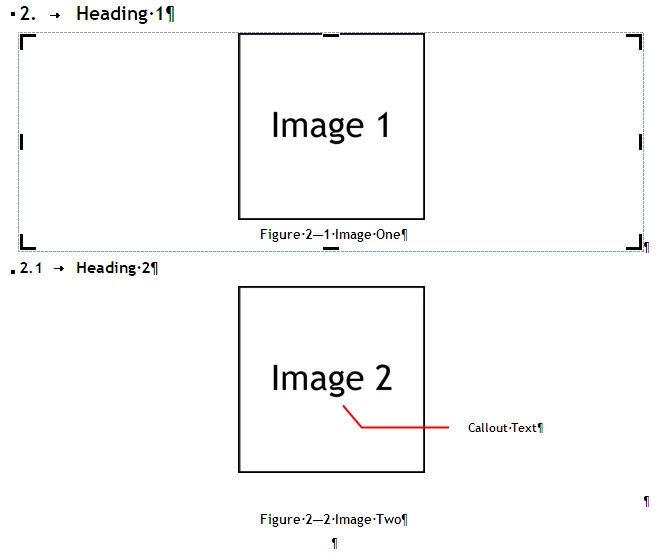
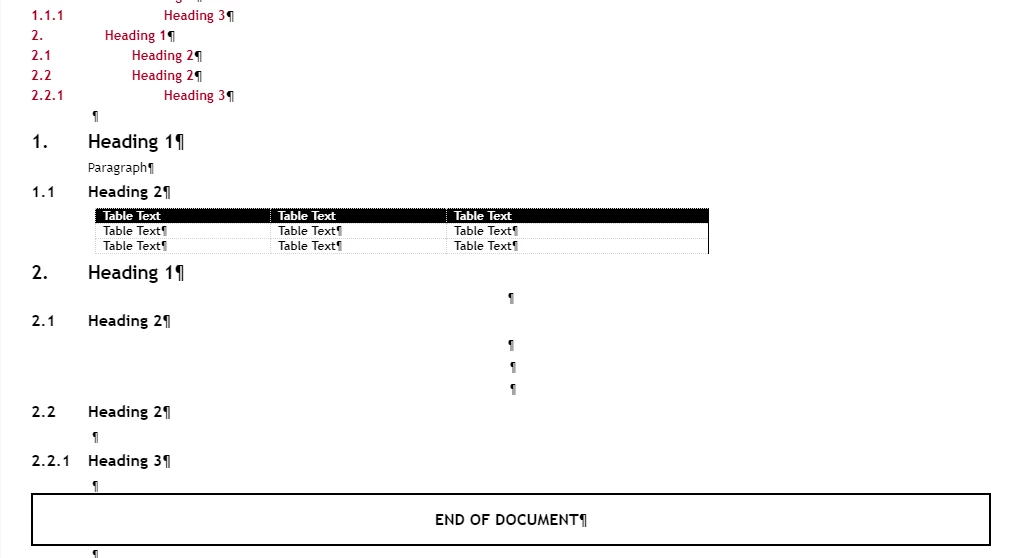
When I link to that particular document though, when I Generate/Update HTML, it will not generate any sort of image.

This is all it will display, and there are not images in the HTML, just the styling that was pulled from the Word document.
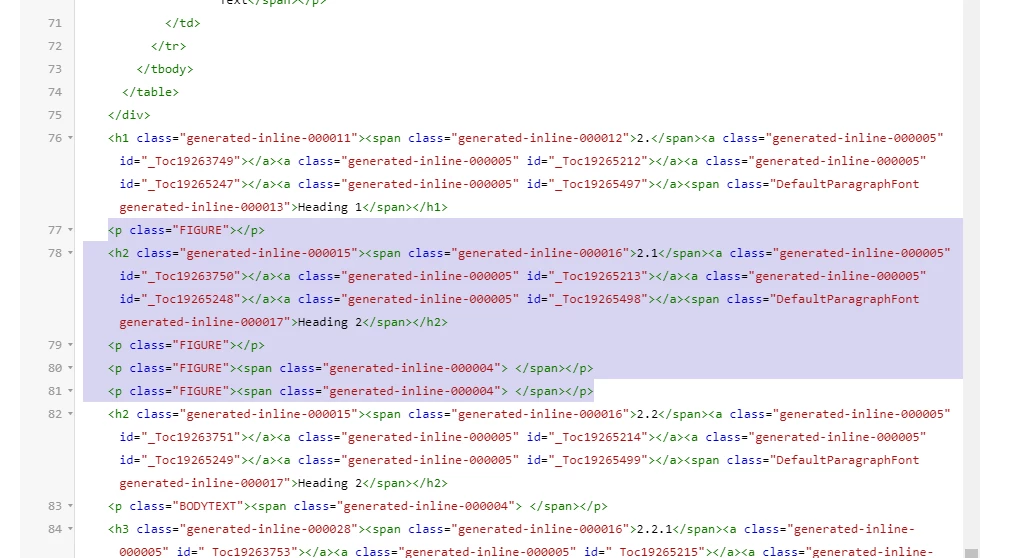
 

If anyone can help me work out what settings I need to adjust in RH for it to pull the images from Word, that would be much appreciated.

    This topic has been closed for replies.

    6 replies

    Peter Grainge
    Community Expert
    Community Expert
    September 25, 2019

    Yes I realise the image problem is key but upgrading was important to see if there was a link. Please prepare a simple Word document with nothing much more than an image of the type giving you grief. Send that to me and I will see what I can come up with. See the Contact page on my site, it's OK to attach the document to your email. Please include a link to this thread.


    Use the menu (bottom right) to mark the Best Answer or Highlight particularly useful replies. Found the answer elsewhere? Share it here.
    Peter Grainge
    Community Expert
    Community Expert
    September 20, 2019

    Does that imply that the project has otherwise updated OK?


    Use the menu (bottom right) to mark the Best Answer or Highlight particularly useful replies. Found the answer elsewhere? Share it here.
    Collision
    CollisionAuthor
    Participant
    September 23, 2019

    Updated project or not, no matter what version of RH2019, it will not load the images from the Word document correctly, even in a new project created in the version 8 update.


    This is my primary concern, I only raised the issue with upgrading the project as it seems to show RH is unreliable when it comes to updating a project when a new software update is released, this is my secondary concern, because if the Word documents are not compatible, I will not be using Robohelp.

    Peter Grainge
    Community Expert
    Community Expert
    September 19, 2019

    Sorry, you did say "customised in the editor" so it should have upgraded. I wonder if with suitable backups is it worth trying again?


    Use the menu (bottom right) to mark the Best Answer or Highlight particularly useful replies. Found the answer elsewhere? Share it here.
    Peter Grainge
    Community Expert
    Community Expert
    September 19, 2019

    If those customisations were made with the skin editor, then upgrading should not have broken it. I can't help you fix it but in your situation I think I would upgrade and customise again. The updates are not minor.


    Use the menu (bottom right) to mark the Best Answer or Highlight particularly useful replies. Found the answer elsewhere? Share it here.
    Collision
    CollisionAuthor
    Participant
    September 19, 2019

    The updates still have not corrected the initial issue with pulling images from Word.

    Drawing canvases are still completely ignored, and images with shapes/callouts on them get pulled in as separate images, breaking the format of the images.


    The skin files breaking is on top of the lost functionality from RH2017/Classic.

    Peter Grainge
    Community Expert
    Community Expert
    September 18, 2019

    There have been so many new features and bug features since 2019.0.1 that continuing with it is your choice but not a realistic way forward. When you talk about your customised skin, was this customised using the UI in Classic or by direct editing. If the latter, I think you will likely have to use a skin from 2019 and customise that. There are more skins in Update 9 including frameless.

    If you still have issues with the images then, noting what you do worked in Classic, then report that here and Adobe can be alerted.

    Can you try 2019 on a second machine?


    Use the menu (bottom right) to mark the Best Answer or Highlight particularly useful replies. Found the answer elsewhere? Share it here.
    Collision
    CollisionAuthor
    Participant
    September 18, 2019

    The skin I am referring to was one I customised in 2019.0.1 in the Skin Editor (I took one of the defaults and customised that), when I tested the 2019.0.8 update, it upgraded my files.

    After it did this, my skin would no longer have sidebar buttons to switch between TOC, Glossary, etc.

    It also broke the font and would not use the one I specified.

    Jeff_Coatsworth
    Community Expert
    Community Expert
    September 17, 2019

    So first thing would be - what version of RH2019? Are you all up to date? Are you trying this with the Classic version or the new style one? What's the resulting topic in RH looking like? Next idea would be to try sticking an image in your Word doc and see how that comes across to RH. I suspect that you'll need to "flatten" your images in the Word doc to get them to come across as one image (not a "canvas").

    Collision
    CollisionAuthor
    Participant
    September 17, 2019

    I am using RH 2019.0.1, I tired updating it to the latest, but it lost functionality (generating HTML from the linked word document) and comeplety broke my custom skin that I made, so I had to roll back.

    The second image in my original post is what the topic looks like in Robohelp.

    A single image by itself, not in a canvas does work, however for the Word documents that are being authored and linked, canvases are essential, as they will be technical documents will callouts, they will need to remain editable, so flattening them is not an option.


    I will stress that this function worked in the 2017/Classic versions of Robohelp.