
Inspiring
April 23, 2019
Answered

RH2019 printed output cuts text at page breaks

  • April 23, 2019
  • 1 reply
  • 760 views

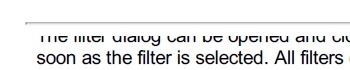
Using RH2019 and printed documentation output. When a topic goes on to a new page, the text is cut in half horizontally, as shown in the image here. I made it so that there are no page breaks within <p> tags (and other tags), and added top margins to those tags, to no avail. Does anyone have any thoughts on how I can avoid this? Thank you!
This topic has been closed for replies.
Correct answer Peter Grainge

Can you create a mini project that has this problem and send it to me? See the Contact page on my site and send the project as instructed there. Do make sure you include a link to this thread and please do not email the project direct.


See www.grainge.org for free RoboHelp and Authoring information.

@petergrainge

1 reply

Peter Grainge
Community Expert
Community Expert
April 23, 2019

This is the new RoboHelp 2019, not 2019 Classic and you have all updates applied, correct?

Have you tried adjusting the PDF settings in the preset?


See www.grainge.org for free RoboHelp and Authoring information.

@petergrainge

Use the menu (bottom right) to mark the Best Answer or Highlight particularly useful replies. Found the answer elsewhere? Share it here.
LDillAuthor
Inspiring
April 24, 2019

Hi Peter - Yes, this is the new RH 2019, not classic, with the latest update. I tried changing PDF settings, and master page layout. These do impact the output as expected, but the first line is still cut horizontally. Thank you

Peter Grainge
Community Expert
Peter GraingeCommunity ExpertCorrect answer
Community Expert
April 24, 2019

Can you create a mini project that has this problem and send it to me? See the Contact page on my site and send the project as instructed there. Do make sure you include a link to this thread and please do not email the project direct.


See www.grainge.org for free RoboHelp and Authoring information.

@petergrainge

Use the menu (bottom right) to mark the Best Answer or Highlight particularly useful replies. Found the answer elsewhere? Share it here.