
Participant
November 26, 2018
Question

RH2019 Responsive H5 layout generating doesn't finish

  • November 26, 2018
  • 1 reply
  • 424 views

I have upgraded my Robo10 project to the RH2019 project.  All things go well.

Then I created an H5 preset, and set some settings, then clicked generating, but after several hours, the process is still continuing. I don't know why.
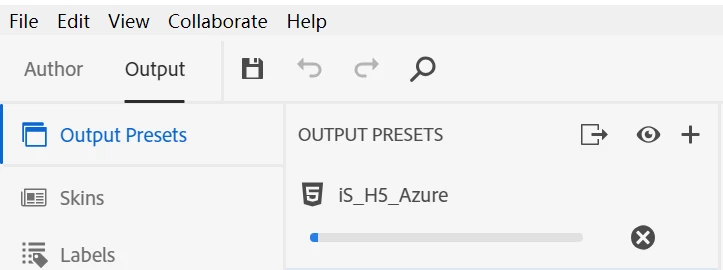
Ps: there's another problem when I upgraded the project. If I first open RH2019 classic, and upgrade my robo10 project, after the upgrade finished, then I open RH2019 to upgrade the classic project, all things in the new 2019 project are OK.  If I directly use RH2019 to upgrade my robo10 project, many files just under the root project are missing, like those .hhc, and some pictures.

This topic has been closed for replies.

1 reply

Peter Grainge
Community Expert
Community Expert
November 26, 2018

First question is have you applied the updates to 2019? If not, try that.

You have referred to H5 and that is part of the name of the HTML5 preset you are using. Is there something special about this layout such as some customisations that you have applied? If so, try with a completely unaltered skin.

Did you save the changes to the skin

If it is none of those, then I think we need to see the other settings.

On the upgrade issue, try deleting the CPD file in the 2019 Classic project and reopening the project.


See www.grainge.org for free RoboHelp and Authoring information.

@petergrainge

Use the menu (bottom right) to mark the Best Answer or Highlight particularly useful replies. Found the answer elsewhere? Share it here.
Participant
November 26, 2018

Hello, Perter. I removed some contents in the table of contents file, and regenerate the output again. After a few minutes, the generating succeeded. So I guess, the new RH2019 may have some problem when generating outputs with long .toc file, but in fact my .toc file is only 100kb.

And I think if RH2019 can display the progress, for example how many minutes left to finish, it will be more friendly.

For the upgrade problem, I found I was wrong upgrading from rh10 project by using RH2019, because RH2019 only supports upgrade the classic project. So I think I should convert rh10 project to classic project first, then with RH2019 to upgrade it.

Adobe Employee
November 26, 2018

Did you face the issues once you had upgraded from RH10 -> RH2017 (Classic) and then tried in the new application ?

Thanks

Amitoj Singh