


Tejas Dandekar
Inspiring
September 17, 2021
Question

RH2020 - clicking logo doesn't take you to the landing page/home page

  • September 17, 2021
  • 8 replies
  • 334 views

I had checked a few months back about this scenario.

I have a frameless online help output. Works perfectly on local machine.

When I am am navigating through the help topic and I want to go to the landing page (with tiles) upon clicking the logo, it works perfectly on local machine.

When I copy the help output to the web server (on AWS) everything else works. But when I click the logo to return to the home/landing page (with tiles). It doesn't work.

Upon clicking the logo nothing happens. No error. just displays blank while space/page in the right pane:
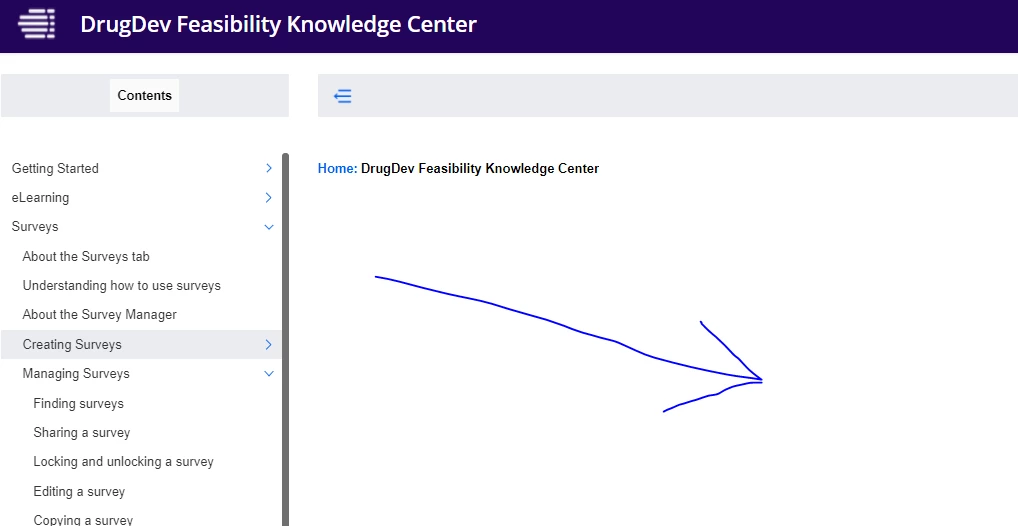
Ideally when I click the logo it should take me to this landing/home page:

Any idea if this is a bug? Not sure if this can be fixed. It happens ONLY when the output is hosted on a web server.

This topic has been closed for replies.

8 replies

Peter Grainge
Community Expert
Community Expert
September 1, 2022

Almost certain then it is a server issue. I don't know whether Support will be able to help you on that.


I think getting the developer to compare the local copy with the server copy is worth the effort, alternatively just trashing what is on the server and publishing again.

________________________________________________________

My site www.grainge.org includes many free Authoring and RoboHelp resources that may be of help.


Use the menu (bottom right) to mark the Best Answer or Highlight particularly useful replies. Found the answer elsewhere? Share it here.
Peter Grainge
Community Expert
Community Expert
August 31, 2022

The warning I am talking about is at the end of generating. You either get a message to say the generation has completed or it has completed but with warnings. Which message to you get?

________________________________________________________

My site www.grainge.org includes many free Authoring and RoboHelp resources that may be of help.


Use the menu (bottom right) to mark the Best Answer or Highlight particularly useful replies. Found the answer elsewhere? Share it here.
Known Participant
August 31, 2022

Completed successfully every time

Known Participant
August 31, 2022

No warnings. When I hover over the word "Home" or the logo, the paths I see look the same and they look correct to me. I have contacted Adobe tech support and they said they would look into it.

Peter Grainge
Community Expert
Community Expert
August 31, 2022

OK. Please let us know what you find.


If the default topic has a path that shows it is in the project, then it should work. The other question is when you generate, do you get a warning Generated but with errors? If you don't then the more you say sounds like it's a server issue.

________________________________________________________

My site www.grainge.org includes many free Authoring and RoboHelp resources that may be of help.


Use the menu (bottom right) to mark the Best Answer or Highlight particularly useful replies. Found the answer elsewhere? Share it here.
Known Participant
August 31, 2022

Hi @Peter Grainge Yes I see that on your site, the logo takes you back to the home page as expected. And on my local files, this works just fine (which is making it hard to debug).


If by Preset > Logo you mean the Header Logo URL field, no I am not using that. I don't know how the files get to the server but I will discuss this with the developer.


I am having issues with some other topics that do not fully load until you refresh the browser, so I was thinking these issues might be related---not to the home page URL itself, but to some larger issue on the server. I also contacted Adobe tech support since I am running out of time on this project.

Known Participant
August 30, 2022

I am having the same issue. When I view my output files locally, clicking the "Home" link reloads the home page content. But when I view the files from the web server, the content area is blank (however, the page title is correct in the breadcrumb trail). I mapped the logo in the header to the same home page file and get the same results (the hoem page content is not reloaded when you click the logo).


I have a developer looking into this and he says it's a bug in the application. Does anyone know if this has been entered as a bug and acknowledged by Adobe? I'm having no luck searching the bug tracker. Thanks!

Peter Grainge
Community Expert
Community Expert
August 31, 2022

You can't find a bug report because I don't believe there is a bug. If you click the logo on the RoboHelp Tour Introduction (grainge.org) you will find it works as it should, which is to take the user to the default topic. If there was a bug, I would expect many more people to be jumping in on this thread.


Unfortunately @Tejas Dandekar didn't post back with how the issue was resolved.


In the Preset > Logo you can define somewhere different if required. Have you used that field and perhaps there is something wrong with the URL there. You only need to define a URL when the default topic is not what you want.


How is the output getting onto the server? Ask your developer to use a tool like Beyond Compare to see if there is a difference between the local copy and the server copy.

________________________________________________________

My site www.grainge.org includes many free Authoring and RoboHelp resources that may be of help.


Use the menu (bottom right) to mark the Best Answer or Highlight particularly useful replies. Found the answer elsewhere? Share it here.
Peter Grainge
Community Expert
Community Expert
September 17, 2021

By that you mean you are seeing 21 items being a total of the root files and folders. If you drill down into the folders does everything still show?


My guess is it will because presumably that topic opens when you access the help, just not when you click the icon, correct?


Can you temporarily upload another project to the server to test? Ideally the About RoboHelp sample project as it is a known quantity.

________________________________________________________
See www.grainge.org for free Authoring and RoboHelp Information

Use the menu (bottom right) to mark the Best Answer or Highlight particularly useful replies. Found the answer elsewhere? Share it here.
Peter Grainge
Community Expert
Community Expert
September 17, 2021

When I am am navigating through the help topic and I want to go to the landing page (with tiles) upon clicking the logo, it works perfectly on local machine.


You are saying that when you click the logo on the left below, you get the blank page, correct?


If so and it works locally, then it looks like something is not getting uploaded properly.

________________________________________________________
See www.grainge.org for free Authoring and RoboHelp Information


Use the menu (bottom right) to mark the Best Answer or Highlight particularly useful replies. Found the answer elsewhere? Share it here.
Tejas Dandekar
Inspiring
September 17, 2021

Right.

Hmm wonder why because I either 7zip the folder or copy and paste the complete folder from the local machine to the web server. The contents are not disturbed. 

Also, I have 21 objects in the help folder on the local machine and after copying it to the web server i can see 21 objects. So files arent getting missed after copying.