Inspiring
October 28, 2020
Answered

RH2020 Update 2: How to SEARCH for topic in the TOC listing

  • October 28, 2020
  • 1 reply
  • 275 views

How to perform Search for topic in the TOC?

Cannot find in RH2020 latest update 2 Nor in RH2019

Jackie

    This topic has been closed for replies.
    Correct answer leonaJackieS

    received reply to a separate inquiry with the details, this issue can be closed.

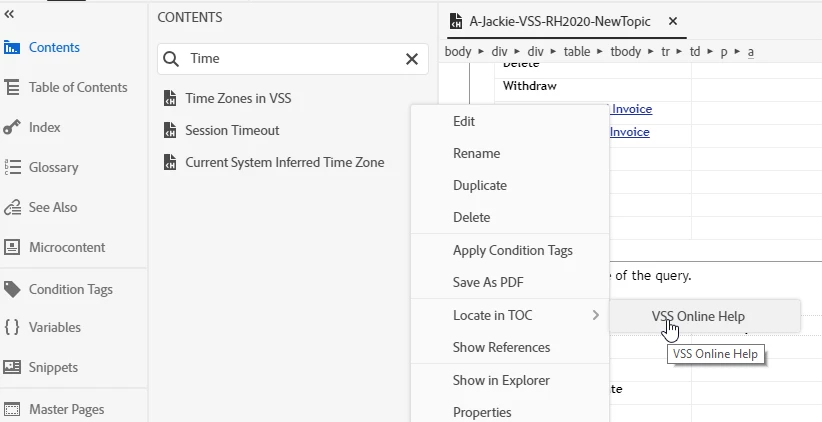
    go to Contents tab > Search for the topic > Right- Click the topic > Locate in TOC


    1 reply

    Peter Grainge
    Community Expert
    Community Expert
    October 28, 2020

    Search in the source? In 2020 it's at the top of the Contents panel. 


    Use the menu (bottom right) to mark the Best Answer or Highlight particularly useful replies. Found the answer elsewhere? Share it here.
    Inspiring
    October 28, 2020

    sorry, I may not have clearly clarified my issue. I have the TOC pane open, I wish to locate a particular page within the TOC - I can not find a Search feature specific to the TOC searching.

    There was a Find option in the RH2015 TOC but it does not exist in RH2019 or RH2020 - at least not where it was in RH2015.   Opened TOC pane, right click on any topic within the TOC listing and there was a Find Topic issue. This does not exists in RH2019 or RH2020. Only options available are Edit, Rename, Duplicate, Delete. the Find option is not available.


    leonaJackieSAuthorCorrect answer
    Inspiring
    October 28, 2020

    received reply to a separate inquiry with the details, this issue can be closed.

    go to Contents tab > Search for the topic > Right- Click the topic > Locate in TOC