


Known Participant
October 5, 2021
Question

RH2020 Update 6: Headings issue in TOC of PDF output

  • October 5, 2021
  • 2 replies
  • 207 views

Hi,

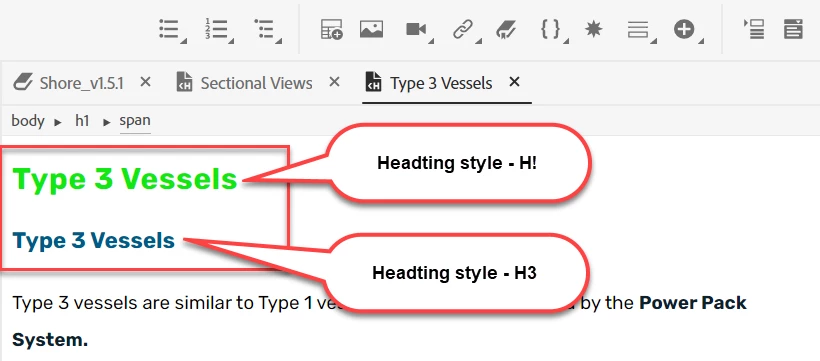
To achieve the desired levels of TOC hierarchy in the PDF output, I  added two headings, that has different heading style, in a topic. 


The 1st heading (in green) must be displayed only in Online Output. It is displayed in green because it is conditionalised. 

The 2nd Heading must be displayed only in PDF output. 
When I produced the output, this is how it is displayed in the TOC. 


Since the heading of Online output is conditionalised, it is hidden but the leeds and the page number is displayed. 
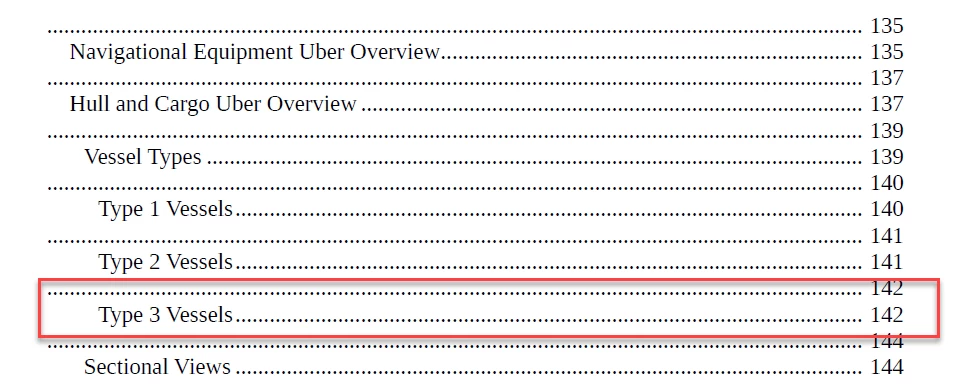
I would like to know whether this (display of leeds for a hidden heading) is the expected behavior or is there a way to hide it in TOC too? 

Is there any other method to hide the one of the headings in a topic?

    This topic has been closed for replies.

    2 replies

    Community Expert
    October 5, 2021

    I wonder if you have conditioned the entire paragraph or only the text within the paragraph? In your first screenshot I can see a span tag which suggests you might have conditioned out only the text, leaving the paragraph in the output. That could explain the extra reference in the TOC.


    Right-cllick on the h1 in the breadcrumbs bar and select Apply Condition Tag and see how that goes.

    Divya VAuthor
    Known Participant
    October 19, 2021

    Hi Amebr,


    Thank you for the solution. I tried this and this is how it worked:

    1.  The h1 is hidden in the Contents page but only the heading is hidden. There is an empty space where the h1 is hidden.
    2.  In the TOC page, there is an empty lead and page number. 


    Peter Grainge
    Community Expert
    Community Expert
    October 5, 2021

    An altogether easier way might be to have two CSS files with all the same styles but different definitions.

    mystylesonline.css

    mystylesprint.css

    ________________________________________________________
    See www.grainge.org for free Authoring and RoboHelp Information

    Use the menu (bottom right) to mark the Best Answer or Highlight particularly useful replies. Found the answer elsewhere? Share it here.
    Divya VAuthor
    Known Participant
    October 19, 2021

    Hi Peter,


    As suggested, I used different CSS files. The TOC only picked up the required font in the TOC. I worked with another hack to obtain the required output in the TOC.