Known Participant
December 22, 2024
Question

RH2022 help displays without formatting in live product

  • December 22, 2024
  • 2 replies
  • 557 views

We recently converted from RH2015 to RH2022. We have a large help system with numerous merged subsystems all pulled together through a parent project TOC. (We followed the video tutorial in setting this up.)

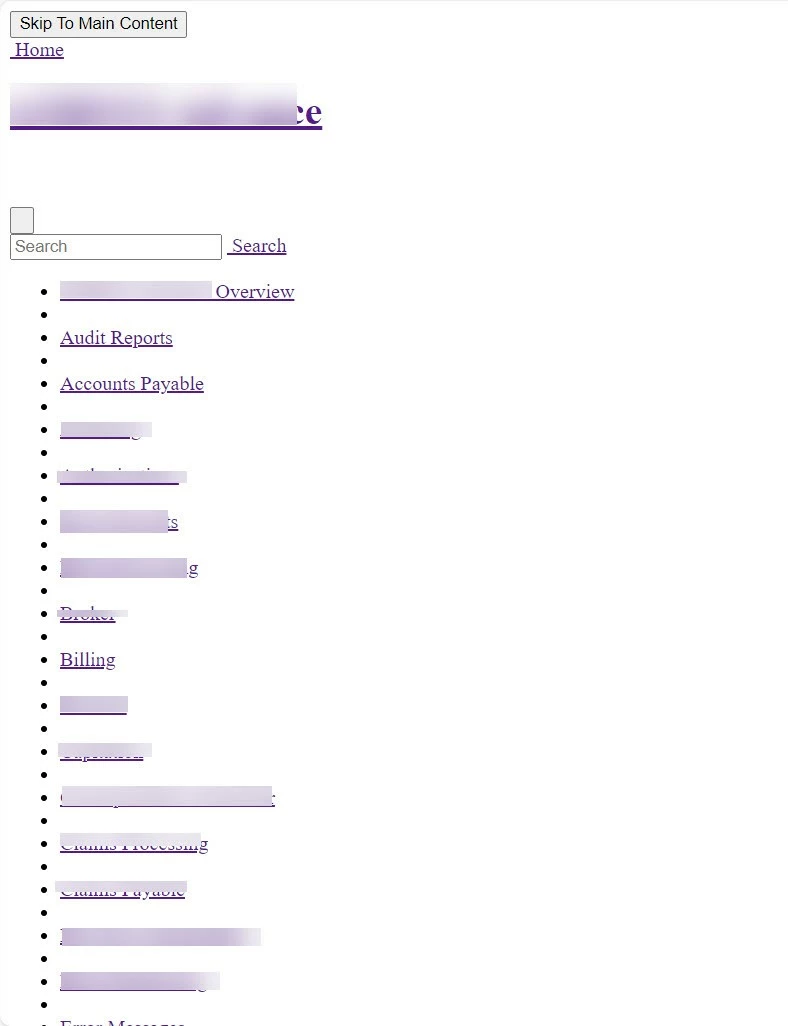
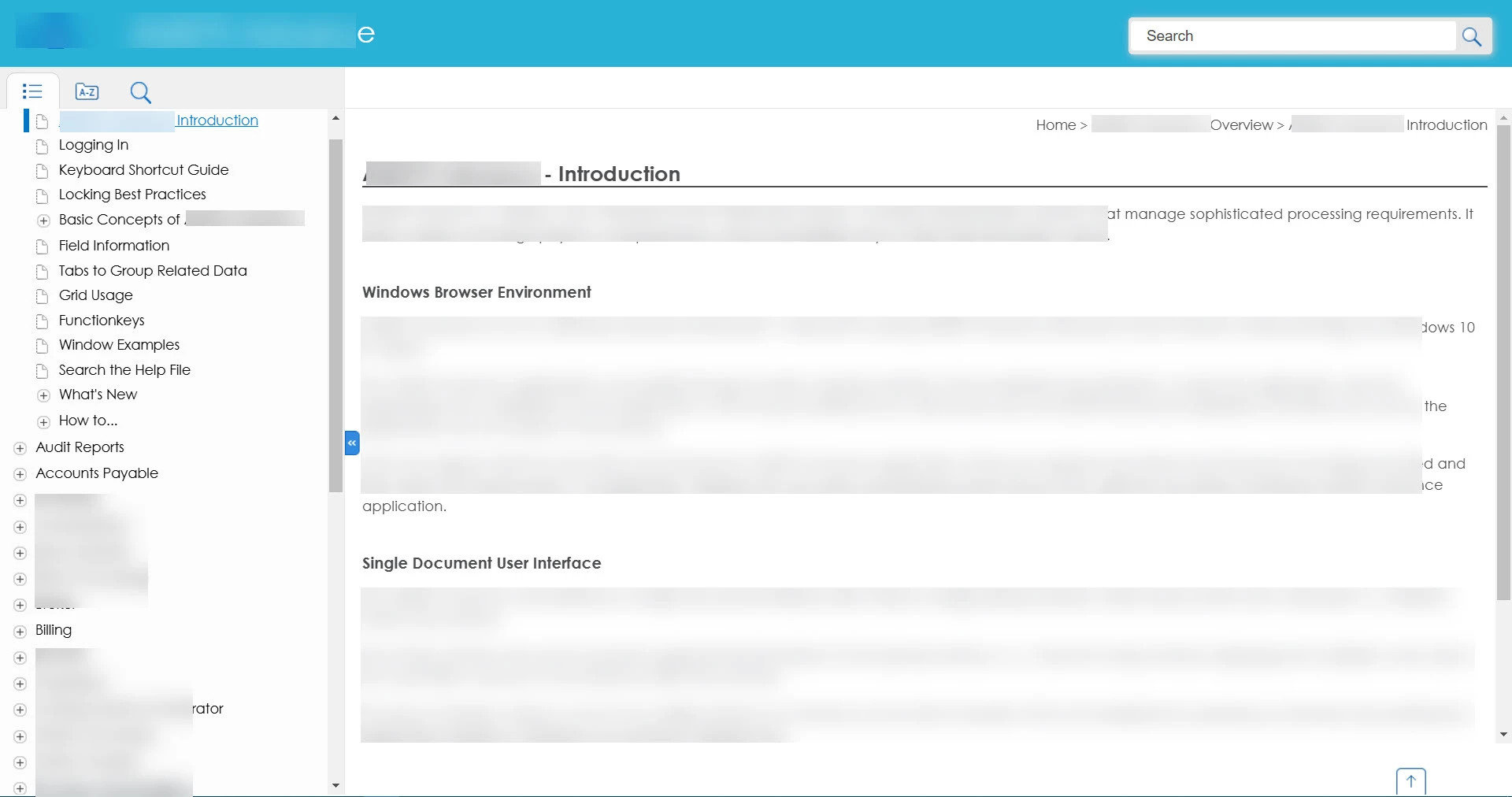
Initially, the help displayed correctly through both Windows Explorer and the live product.  Lately, however, it has displayed as seen in the attached screenshot when opened from the live product. Has anyone see this before?  Do you have any idea what might be causing it? 

The live product is set up so that users can select a button to open help "on this window"  to see help for just that screen, or "open help," which opens the intro subsystem and the master TOC. Regardless of which is selected, the help appears wonky.

The first screen shot is from Windows Explorer--this is how it should display. The second screen shot is how it actually displays from the live product.

Any help is appreciated!


    This topic has been closed for replies.

    2 replies

    Peter Grainge
    Community Expert
    Community Expert
    December 23, 2024

    When you say sub-systems I assume you mean child projects in a merge.


    I would be going to the parent and setting up the child projects again and then checking that the outputs are generating to the correct folders within mergedProjects. Generate the parent first in this scenario.


    Bear in mind that in the new UI child projects are not designed to work standalone. Does your colleague's child project work OK within the merge?

    ________________________________________________________

    My site www.grainge.org includes many free Authoring and RoboHelp resources that may be of help.


    Use menu (bottom right) to mark as Best Answer or to Highlight particularly useful replies. Found the answer elsewhere? Share it here.
    jas35401Author
    Known Participant
    December 23, 2024

    Correct, I am referring to child projects in a merge. They don't stand alone, but usually when opened they don't appear completely without formatting.  I only mentioned this because my colleague is working on a new product and is having the same issue as I am, so old RH2015 code is probably not the culprit.

    Jeff_Coatsworth
    Community Expert
    Community Expert
    December 23, 2024

    What patch version of RH2022 are you running?

    Peter Grainge
    Community Expert
    Community Expert
    December 23, 2024

    When you upgraded, were the calls to the help changed? Also was the target folder on the server flushed before publishing the new output. I'm wondering if the call is somehow finding old content.


    Remember, generating flushes the target folder for that process, publishing does not.

    ________________________________________________________

    My site www.grainge.org includes many free Authoring and RoboHelp resources that may be of help.


    Use menu (bottom right) to mark as Best Answer or to Highlight particularly useful replies. Found the answer elsewhere? Share it here.
    jas35401Author
    Known Participant
    December 23, 2024

    The server flush sounds reasonable for our product that has pre-existing RH2015 help. However, a colleague working on a new product line and using only RH2022 is also having this issue on one of her subsystems. In her case, she sees the unformatted help in Windows Explorer. I only see it in the live product.

    Any other thoughts on what might be causing this? We are heading down to the wire with our release deadline.


    Jeff_Coatsworth
    Community Expert
    Community Expert
    December 23, 2024

    Is it happening in any other browser on their system?