

Inspiring
July 20, 2026
Answered

RH2022 is not accepting the template I created

  • July 20, 2026
  • 4 replies
  • 24 views

I proceeded step-by-step in creating a template for a user guide, just as I have for the last dozen or so, but when I click “View Output,” I get this:
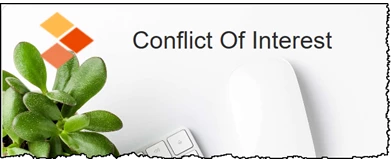
instead of this:
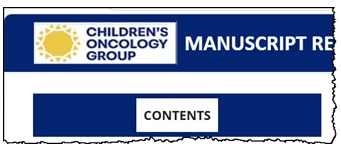
Any ideas? 

Thank you,

Lon

    Correct answer LonTheWriter

    My most humble apologies, gents … I was using a PDF table of contents … fixed

    4 replies

    LonTheWriterAuthorCorrect answer
    Inspiring
    July 21, 2026

    My most humble apologies, gents … I was using a PDF table of contents … fixed

    Jeff_Coatsworth
    Community Expert
    Community Expert
    July 21, 2026

    Do you always create output on a network drive? Where is the project located? 

    Peter Grainge
    Community Expert
    Community Expert
    July 21, 2026

    That looks like a Home Page rather than a Topic Page. Does it have some TOC tiles on it?


    My site www.grainge.org includes many free Authoring and RoboHelp resources that may be of help.

    Use the menu (bottom right) to mark the Best Answer or Highlight particularly useful replies. Found the answer elsewhere? Share it here.
    Inspiring
    July 20, 2026

    ...for further information, when I generate the user guide, this appears in the address bar:

    \\cogfiles\department\IS\Technical Writers 2022\Robohelp 2022-Projects\Manuscript Review-Author\outputs\Conflict Of Interest\Conflict Of Interest\index.htm


    However, this is my Output Path:

    K:/IS/Technical Writers 2022/Robohelp 2022-UserGuides/Conflict Of Interest/Frameless/