

RH2022 merged project frameless output. how to replace calls to bagagefile (external files)
Hello,
when upgrading from rh2019 classis of a merged project originalle with chm output, my links to external project do not work anymore.
eg aanvragen01.chm::/Wat_is_objectcreatie_.htm is a link, must be replaced by something else.
to which file should I point is my first question…
if i choose link to local file and navigate to
../../../../output/mergedProjects/Aanvragen01/Wat_is_objectcreatie_.htm
I get an error; ‘Your file couldn’t be accessed’, although the preview is shown when determining the link
I also have an error when compiling :
Skipped copying external file "C:/RH/output/mergedProjects/Aanvragen01/Wat_is_objectcreatie_.htm"
which is a bit strange as it is not needed to be copied, but anyhow the path is not right (rimses in the beginning is missing)...I don’t know where to correct that.
when I navigate with a browser to the place, I can open the file
C:\RH\rimses\output\mergedProjects\Aanvragen01
I’m getting the feeling I’m missing somemthing stupid.
Hopefully you can shed your light here
I have an bonus question: which settings do i need to use for the ‘display in’ dialog in the link to window (Frame I suppose, and then: ...)
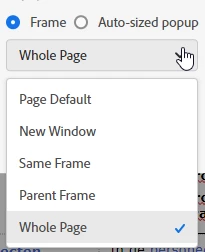
I’m using a frameless setup.
best regards
Olivier


 AdChoices