


Inspiring
August 7, 2026
Question

RH2022 old topic keeps appearing in Table of Contents along with newer version

  • August 7, 2026
  • 5 replies
  • 26 views

Yet again, RH2022 acts in mysterious ways. I replaced a topic with a newer one, but the old one keeps appearing anyway; even though it does not appear in the ToC template, 
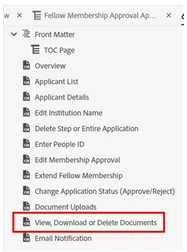
Note there is only one “View, Donwload or Delete Documents” topic

...but when I compile the PDF, I get this:
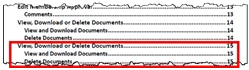
The boxed topic is the correct one

I’ve tried completely deleting the PDF template and creating a new one, but nope...

    5 replies

    Jeff_Coatsworth
    Community Expert
    Community Expert
    August 11, 2026

    I could see potentially how importing the topic from a 2017 Classic project into a 2022 New UI one might not work - unless it knew enough to convert the topic as it imported it. But copy/pasting into a fresh topic should have worked (if it was a clean text copy/paste that you then formatted with your 2022 project styles).
    You’ve verified that the content in the RH project is the new stuff, right? If you generate any other forms of output, the new topic is coming through fine?

    Inspiring
    August 10, 2026

    Sorry, Jeff, for not actually answering your question … first, I deleted it, then imported it from the previous (2017) version of RH. Then, failing that, created a new (blank) topic, then copy/pasted the content from the previous version. Then tried deleting the PDF ToC and creating a new one from scratch … nada. Then tried deleting the PDF itself and its related ToC, recreated those from scratch … nada dos. running out of things to try...

    Jeff_Coatsworth
    Community Expert
    Community Expert
    August 10, 2026

    How did you replace the old topic with the new one? Complete gutting of the existing topic & replacement with new content? Or delete the file entirely and add a new one?
    Also, is there any version control at play here?

    Inspiring
    August 10, 2026

    First, I replaced the old topic with a new one; that didn’t work, so i replaced the table of contents with a new one; no change, old topic still hanging on. Just a while ago, I deleted the Output Preset, the PDF, the PDF ToC and recreated from scratch. That little bugger is still there…

    ...and no, no version control at play...

    Jeff_Coatsworth
    Community Expert
    Community Expert
    August 10, 2026

    So how exactly did you replace the old topic with a new one - file deletion or content swapping?