
Inspiring
September 17, 2024
Answered

Rh2022 - on startup of Microsoft HTML help, get "can't reach this page Make sure the web ..." error

  • September 17, 2024
  • 10 replies
  • 1855 views

I converted classic projects from RH9 to Rh2022, output to run under Windows 10.

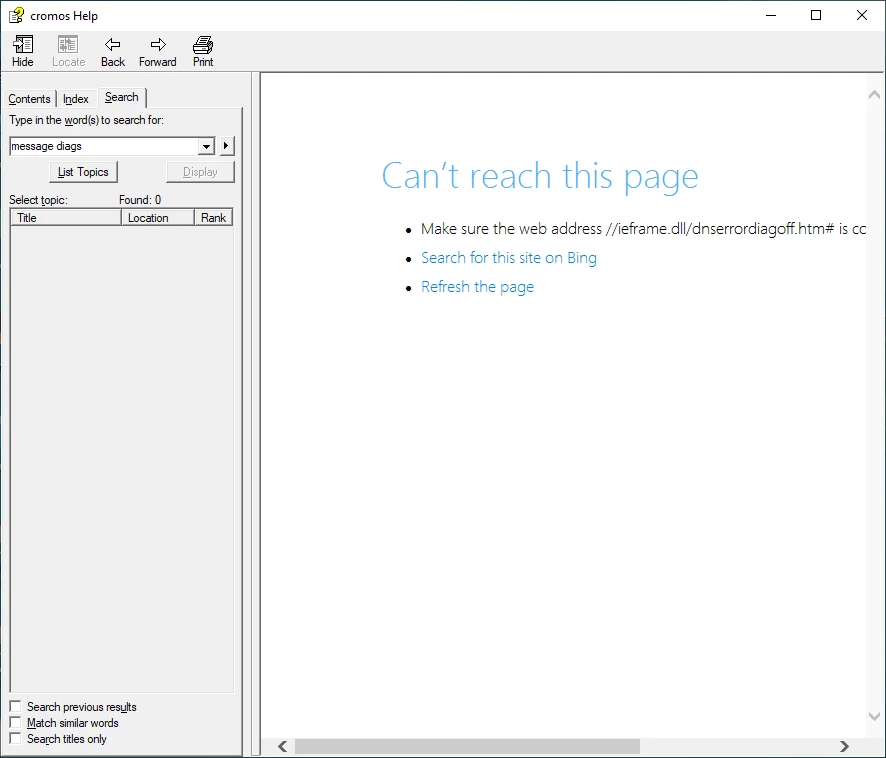
When help is started via a call to HtmlHelp that looks like the one below, I get the error as shown in the attached picture "Help not working.png":


hwndHelp = HtmlHelp (hwndParent,  szclHomePath + szclURL + _T(">Main"), HH_DISPLAY_TOPIC, NULL);

where

szclHomePath is c:\cromos 3.0\toolset\Help\C2000Help.chm::/redirect.xhtm#

szclURL is          C2000Help.chm::/C2000_Help_introduction.htm


From a command line, everything is fine if I use this command:

hh.exe ms-its:c:\cromos 3.0\toolset\help\C2000Help.chm::/C2000_help_introduction.htm#Retrieve


From this, I deduce that the problem is something to do with redirect.xhtm.

When I compare the generated chm file from RH9 with the generated file from RH2022, I see that redirect.xhtm is not in the RH2022 file (using BeyondCompare).

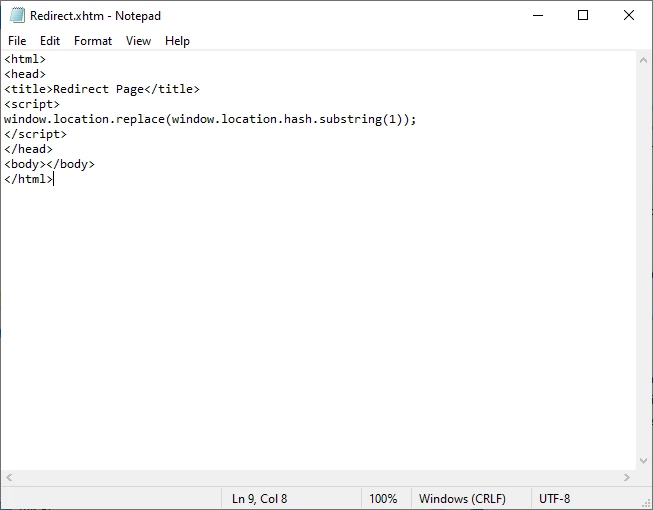
The contents of the redirect file are shown in the attached picture  "contents of redirect file.png".


Does anyone have any idea please of how to get the call to htmlhelp work in the way it did in RH9 ?


    This topic has been closed for replies.
    Correct answer Irene378560618xyx

    I have received a lot of helpfulo comments and I also had a phone conversation with an Adobe person, who said that the 'redirect' is no longer supported.

    I have received an email from Adobe asking me to mark one of the replies as correct. Since none of the replies actually solves the problem, I cannot do that.

    10 replies

    Peter Grainge
    Community Expert
    Community Expert
    September 25, 2024

    See Item 12 at https://www.grainge.org/RoboHelp_Gems/RoboHelp_Gems.htm#chms

    ________________________________________________________
    My site www.grainge.org includes many free Authoring and RoboHelp resources that may be of help.


    Use menu (bottom right) to mark as Best Answer or to Highlight particularly useful replies. Found the answer elsewhere? Share it here.
    Irene378560618xyxAuthorCorrect answer
    Inspiring
    September 25, 2024

    I have received a lot of helpfulo comments and I also had a phone conversation with an Adobe person, who said that the 'redirect' is no longer supported.

    I have received an email from Adobe asking me to mark one of the replies as correct. Since none of the replies actually solves the problem, I cannot do that.

    Peter Grainge
    Community Expert
    Community Expert
    September 18, 2024

    See my Private Message to you. There will be a red dot over and envelope top right of the browser.

    ________________________________________________________

    My site www.grainge.org includes many free Authoring and RoboHelp resources that may be of help.


    Use menu (bottom right) to mark as Best Answer or to Highlight particularly useful replies. Found the answer elsewhere? Share it here.
    Inspiring
    September 18, 2024

    THanks. I shall be on the lookout for it but I don't see what you describe yet.

    Peter Grainge
    Community Expert
    Community Expert
    September 17, 2024

    I have asked several times why the redirect! 

    ________________________________________________________
    My site www.grainge.org includes many free Authoring and RoboHelp resources that may be of help.


    Use menu (bottom right) to mark as Best Answer or to Highlight particularly useful replies. Found the answer elsewhere? Share it here.
    Inspiring
    September 18, 2024

    Sorry Peter - two conversations going on at once.

    I established late yesterday afternoon that without the 'redirect' in the 2nd parameter to the call to htmlhelp, the help appears coorectly and then when you click somewhere else to launch different content, that appears, but in a separate window rather than in the one that is already open.

    Given that and the comment from Jeff, the purpose of the redirect seems to have been to get the help to appear in the first window that is displayed.

    Is there another way to get the help content to appear like that ?

    There is a suggestion that I would be better going down the merged help route.

    Peter Grainge
    Community Expert
    Community Expert
    September 17, 2024

    It looks like you have read the wrong part. mergedProjects is only for frameless and responsive help. For CHMs they can all go in one folder but there has to be a parent project and its TOC will include links to the child projects.

    ________________________________________________________

    My site www.grainge.org includes many free Authoring and RoboHelp resources that may be of help.


    Use menu (bottom right) to mark as Best Answer or to Highlight particularly useful replies. Found the answer elsewhere? Share it here.
    Inspiring
    September 17, 2024

    Yes, the CHMs are all n one folder and the TOC shows the links to child projects when you view it in RH2022.

    I am still convinced that the problem is the redirect.xhtm file because the TH9 final chm does not give the error when started with "redirect" in the parameter. It is for this reason that I don't think the problem is the version of ieframe.dll or any corruption of the same. 

    Peter Grainge
    Community Expert
    Community Expert
    September 17, 2024

    See the Merged Help topics on my site.


    https://www.grainge.org/RoboHelp/Merged_Help/Merged_Help.htm

    ________________________________________________________

    My site www.grainge.org includes many free Authoring and RoboHelp resources that may be of help.


    Use menu (bottom right) to mark as Best Answer or to Highlight particularly useful replies. Found the answer elsewhere? Share it here.
    Inspiring
    September 17, 2024

    Thanks,will look at that.


    Peter Grainge
    Community Expert
    Community Expert
    September 17, 2024

    Just a whole bunch of CHMs or a proper merged CHM setup?

    ________________________________________________________

    My site www.grainge.org includes many free Authoring and RoboHelp resources that may be of help.


    Use menu (bottom right) to mark as Best Answer or to Highlight particularly useful replies. Found the answer elsewhere? Share it here.
    Inspiring
    September 17, 2024

    Now that is a VERY good question that i don't know how to answer. How can I tell ?

    There is a bunch of chm's generated by the projects and I have set the output from these to be the input folder for the final project which is built- C2000Help.

    Peter Grainge
    Community Expert
    Community Expert
    September 17, 2024

    You say different files. Do you mean different topics in one CHM or different CHMs? If the latter I repeat why the redirect? A call to the filename.chm should be sufficient.

    ________________________________________________________

    My site www.grainge.org includes many free Authoring and RoboHelp resources that may be of help.


    Use menu (bottom right) to mark as Best Answer or to Highlight particularly useful replies. Found the answer elsewhere? Share it here.
    Inspiring
    September 17, 2024

    Well Peter it's like this...,

    The name of the htm file inthe call to htmlhelp will be given like this:

    C2000Monitorfilepaths.chm::/Monitoring_file_paths.htm

    So, yes, we are redirecting to a different chm from the main 'Help' chm in the hundreds and hundred of places the user can click to bring up help.

    Peter Grainge
    Community Expert
    Community Expert
    September 17, 2024

    It must be something about your call as no one else has reported this problem.


    The redirect is to open different topics each time? I don't have an answer so I suggest for this one you need to go to Adobe Support. See https://helpx.adobe.com/contact/enterprise-support.other.html#robohelp for your Adobe Support options. The email link tcssup@adobe.com is recommended as it reaches a team dedicated to Technical Communication Suite products including RoboHelp.

    ________________________________________________________

    My site www.grainge.org includes many free Authoring and RoboHelp resources that may be of help.


    Use menu (bottom right) to mark as Best Answer or to Highlight particularly useful replies. Found the answer elsewhere? Share it here.
    Inspiring
    September 17, 2024

    Thank you Peter. Yes, different files depending on what the user clicks on in our system.

    I agree with you that it is something to do with the call.

    Actually, I tried Adobe support on the email you suggest but so far I am struggling to get them to understand what the problem is! 

    Peter Grainge
    Community Expert
    Community Expert
    September 17, 2024

    The CHM is installed on the user's PC, correct? It's a long time since I worked on CHMs but you just pointing to the CHM should open it to the default topic. Why the redirect?

    ________________________________________________________

    My site www.grainge.org includes many free Authoring and RoboHelp resources that may be of help.


    Use menu (bottom right) to mark as Best Answer or to Highlight particularly useful replies. Found the answer elsewhere? Share it here.
    Inspiring
    September 17, 2024

    Correct Peter. The chm files (multiple projects) are on the users PC.

    The fact is that there are many other places in our system where a user clicks on something and is expecting to see the appropriate help but at the moment gets the error described.

    So, in the call to htmlhelp, the only difference in each case is that the name of the .htm file is differenct.