Inspiring
April 9, 2025
Answered

RH2022 PDF headings going into text

  • April 9, 2025
  • 5 replies
  • 1546 views

I'm trying to create a PDF document of a project in RH2022 that is supposed to have a cover page and table of contents. However, I keep getting this:
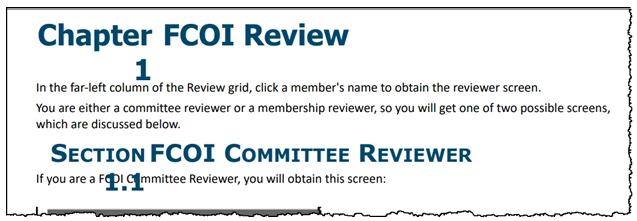
I don't need "Chapter 1" or "Section 1.1"; what I want is a topic heading of "FCOI Review" and subheading "FCOI Committee Reviewer"

Thanks in advance for any help you can provide.

Lon

    Correct answer Peter Grainge

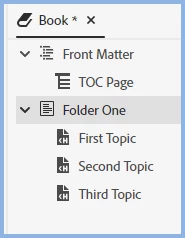
    Yes, I do have TOC Page in Front Matter; I also have topics listed, but still no ToC in PDF... should I auto-create TOC?


    I'm getting lost as to what you have done. 


    Your book type TOC should look like this.


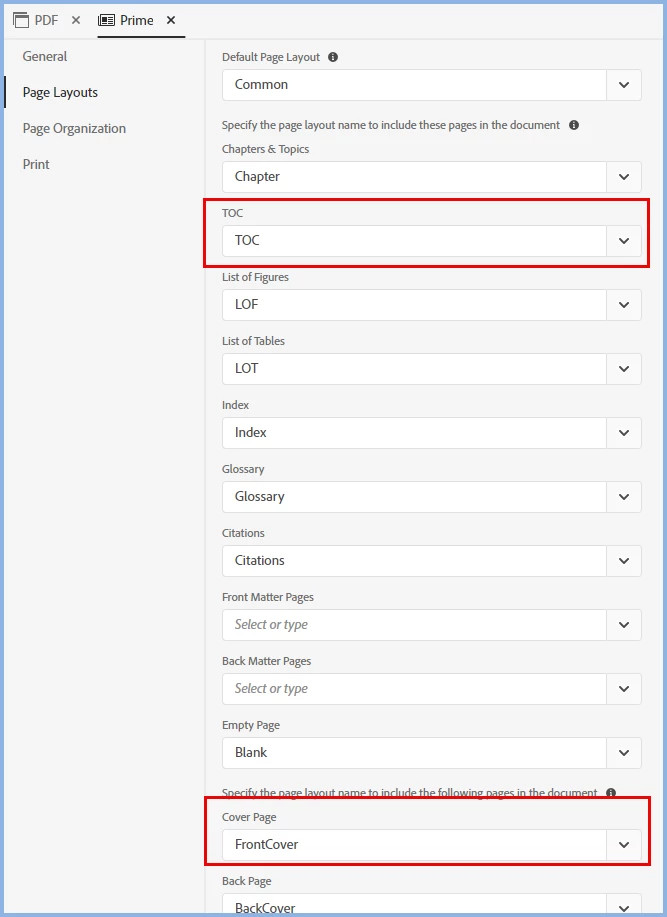
    Your template should look like this.


    If that doesn't help and as you can't share the project, I think you will have to go to Adobe Support and screen share.

    ________________________________________________________

    My site www.grainge.org includes many free Authoring and RoboHelp resources that may be of help.


    5 replies

    Peter Grainge
    Community Expert
    Community Expert
    May 8, 2025

    Yes. Still delete it.  Go into the code if you have to.

    ________________________________________________________

    My site www.grainge.org includes many free Authoring and RoboHelp resources that may be of help.


    Use menu (bottom right) to mark as Best Answer or to Highlight particularly useful replies. Found the answer elsewhere? Share it here.
    Inspiring
    May 14, 2025

    I seem to have also deleted the Table of Contents itself and am still trying to resurrect it.

    Meanwhile, another question: How do I put our company logo on the title page/front cover of the PDF document. I tried going to Page Layouts, then Front Cover, Background and inserting an image path ... nothing.

    Peter Grainge
    Community Expert
    Community Expert
    May 14, 2025

    Open your PDF template and look for Front Cover. Double click it and edit as required.


    It would help you would tell us which of the three PDF templates you are using.


    ________________________________________________________

    My site www.grainge.org includes many free Authoring and RoboHelp resources that may be of help.


    Use menu (bottom right) to mark as Best Answer or to Highlight particularly useful replies. Found the answer elsewhere? Share it here.
    Peter Grainge
    Community Expert
    Community Expert
    April 16, 2025

    Click in that area and click the div tag and then go to Background in the Content Properties.


    Delete what you see there and enter the hex or RGB value of the colour you want. 


    How did I work that out. I simply clicked in that area and saw the Div tag. That told me it was a background colour for the div so the place to look had to be Background.


    Create a duplicate of your template and name it Test. Then you can try things without risk. Mess up, delete it and create another duplicate.

    ________________________________________________________

    My site www.grainge.org includes many free Authoring and RoboHelp resources that may be of help.


    Use menu (bottom right) to mark as Best Answer or to Highlight particularly useful replies. Found the answer elsewhere? Share it here.
    Inspiring
    April 16, 2025

    Thanks so very much, Peter! You helped me get to where we want to be with our PDF document!

    Peter Grainge
    Community Expert
    Community Expert
    April 14, 2025

    With thanks to an Adobe contact, you can remove the numbering from your existing template. See Item 6 at https://www.grainge.org/RoboHelp_Gems/RoboHelp_Gems.htm#printed


    That also covers keeping the numbering but with correct wrapping.

    ________________________________________________________

    My site www.grainge.org includes many free Authoring and RoboHelp resources that may be of help.


    Use menu (bottom right) to mark as Best Answer or to Highlight particularly useful replies. Found the answer elsewhere? Share it here.
    Inspiring
    April 16, 2025

    Thanks ever so much, Peter! That worked perfectly ...

    However, I'm still working on that other problem, the orange banner across the top of the cover page; I have made a good-faith effort to follow your instructions and suggestions, tried to modify all manner of headings (.lof, .glo, chapter headings, etc.), but I still get this:

    thank you for your patient help...

    Lon

    Peter Grainge
    Community Expert
    Community Expert
    April 10, 2025

    You don't get those Chapter and Section numbers if you use the Basic template.

    ________________________________________________________

    My site www.grainge.org includes many free Authoring and RoboHelp resources that may be of help.


    Use menu (bottom right) to mark as Best Answer or to Highlight particularly useful replies. Found the answer elsewhere? Share it here.
    Peter Grainge
    Community Expert
    Community Expert
    April 9, 2025

    Perhaps you are using the wrong template. You need to study the sections on PDF Templates and PDF Outputs on my site. 

    ________________________________________________________

    My site www.grainge.org includes many free Authoring and RoboHelp resources that may be of help.


    Use menu (bottom right) to mark as Best Answer or to Highlight particularly useful replies. Found the answer elsewhere? Share it here.