


Inspiring
August 25, 2026
Question

RH2022 PDF Template -- nothing in Page Layouts

  • August 25, 2026
  • 2 replies
  • 9 views

I’m working with a fairly large project (that’s probably irrelevant) and have tried several times to create a PDF template, but each time, the Page Layouts tab is empty:
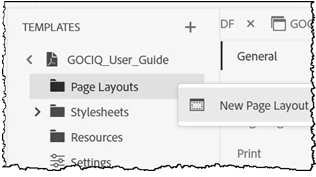
Where is everything? How do I get Headings, Back Cover, Front Cover, etc.?

    2 replies

    Peter Grainge
    Community Expert
    Community Expert
    August 26, 2026

    Also what do you see if you click New Page Layout? It could be that simple.


    My site www.grainge.org includes many free Authoring and RoboHelp resources that may be of help.

    Use the menu (bottom right) to mark the Best Answer or Highlight particularly useful replies. Found the answer elsewhere? Share it here.
    Peter Grainge
    Community Expert
    Community Expert
    August 26, 2026

    The folder that holds the templates has various files but they are not of a type that helps see what is going wrong.

    If you create a new project and that has the same issue, then it looks like something has corrupted your installation. Also try the About RoboHelp sample project. If either of those help, come back here. Otherwise I would be going for an uninstall and reinstall.

    Beyond that, I suggest for this one you need to go to Adobe Support. See https://helpx.adobe.com/contact/enterprise-support.other.html#robohelp for your Adobe Support options. The email link tcssup@adobe.com is recommended as it reaches a team dedicated to Technical Communication Suite products including RoboHelp.

    Post back with how a new project and About RoboHelp work first.


    My site www.grainge.org includes many free Authoring and RoboHelp resources that may be of help.

    Use the menu (bottom right) to mark the Best Answer or Highlight particularly useful replies. Found the answer elsewhere? Share it here.