



Olivier Toebosch
Inspiring
December 24, 2024
Answered

RH2919 Classic merged project. new merged sub project not showing in TOC when running HH.EXE

  • December 24, 2024
  • 2 replies
  • 226 views

Hello, I feel stupid. This must be the 3th or 4th year I need to do this. Succeeded up to now.

I created a new project and included it in the main project (as luggage file).

in toc view, created new merged project. got this
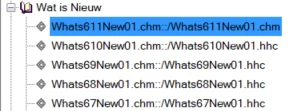
that 6.11 has no hhc extention. Tried different approaches, but got not a different result. When creating the output to MS compiled help, the project does not show in the TOC.

Strange...

any clue someone?

best regards

Olivier

    Correct answer Jeff_Coatsworth

    You following Peter's site? https://www.grainge.org/RoboHelp/Merged_Help/Merged_Help.htm 

    2 replies

    Peter Grainge
    Community Expert
    Community Expert
    January 6, 2025

    Baggage files are NOT the way to merge projects. It will make the content available but they will be separate projects and not merged. Search for example will not be across all the projects.


    You seem surprised that the child projects need to have their own TOC. What the merge does it bring all those TOCs into one TOC, it merges them into one, that's the point. I am not understanding how you would expect the topics in the child projects to be included in a TOC if you don't create one. Am I misunderstanding you?

    ________________________________________________________

    My site www.grainge.org includes many free Authoring and RoboHelp resources that may be of help.


    Use menu (bottom right) to mark as Best Answer or to Highlight particularly useful replies. Found the answer elsewhere? Share it here.
    Olivier Toebosch
    Inspiring
    January 6, 2025

    Hello Peter, you're right about the bagagefile. it is not enough

    It is a succession of not followed steps that had me trapped:

    no TOC on the subproject (stupid me)

    Once fixed, compiled, copied to the main project (in my case the root of the project directory) it is enough to choose the new merged project icon in the toolbar.

    for me this works

    thx for your assistance, Olivier


    Jeff_Coatsworth
    Community Expert
    Jeff_CoatsworthCommunity ExpertCorrect answer
    Community Expert
    December 24, 2024
    Olivier Toebosch
    Inspiring
    January 6, 2025

    Te be honest I found the solution completely alone.

    First of all, the subprojects needs to have a toc too (it is not created automatically) even if it is only one topic

    Secondly you need to click on 'merged project' icon here

    which will import the project (if not use import bagagefile) AND the TOC

    best regards

    Olivier