
April 27, 2012
Question

RH7 compiled topics won't display and throw an IE (syntax) script error

  • April 27, 2012
  • 1 reply
  • 1690 views

Pundits,

I am using RH 7 to create projects of about 600 topics. My OS is Windows XP Pro 2002, SP-3. My problem is that approximately 10% of the topics in my .chm file prompt an IE script error msg when I, or anyone else, tries to open them.

Here's the error msg:
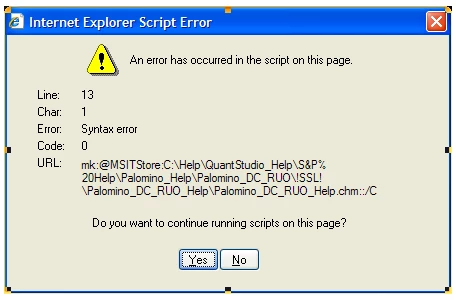
When this window displays, user can click on either Yes or No and topic will display normally; the next time a user attempts to open this topic, same error displays, with same Yes/No click behavior.

When I look at the html for any of the "bad" topics (i.e., topics that won't display), there is always this one extra line of code, referring to the ehlpdhtm.js file in my project folder:

<script language="javascript" src="ehlpdhtm.js"></script>
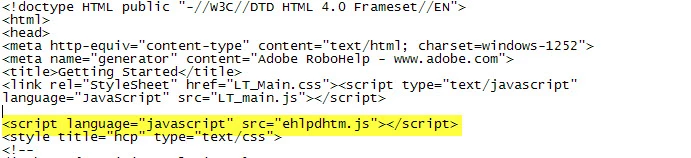
This line is never in the html of the "good" topics.

Can anyone shed any light on what's causing this, and what I can do to remedy the situation?

Thanks in advance.

Dennis

This topic has been closed for replies.

1 reply

Willam van Weelden
Inspiring
April 30, 2012

Hi and welcome to the forum.

ehlpdhtm.js contains the script for DHTML effects. What kind of DHTML effects (dropdowns etc.) do you use?

Greet,

Willam

May 1, 2012

William,

Thanks very much for getting back to me.

I'm not sure if these are considered DHTML effects, but here's a list of some functions that may fit that category:

1) Many of my topics contain pop-ups.

2) Most of them have an "increase font size" graphic that, when clicked, cycles the topic's font to 2x, 3x, 1x.

3) They all have a "print" icon.

One other "clue" that may shed some light on this problem behavior is the fact that for each of the "bad" topics, if I duplicate the topic (from within RH), allow the new topic to keep all of the properties of the "bad" topic, place the new topic alongside the bad topic in my TOC, then compile the project, the new topic will display correctly when it's selected and not throw up the IE script error.

Thanks again.

DC