
Inspiring
October 1, 2009
Question

RH7 - Custom WebHelp Pro skin custom "Print" button does NOT display in version published to RH Server 8

  • October 1, 2009
  • 4 replies
  • 2100 views

I customized a WebHelp Pro skin using the Omega skin as the basis. Everything works fine except the Print button, which I added using the same Action as shown in the BeautifulVista skin's Print button.

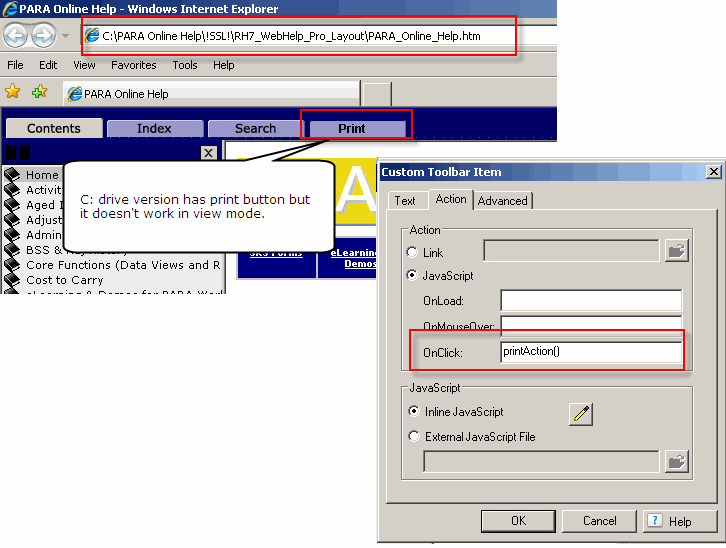
Local Version (C: drive)

  1. When I generate my help project and view it locally from my C: drive after I accept the warning about viewing locally, I see the Print button.
  2. However, it does NOT work.  I've attached a graphic that shows the local version and the skin dialog where I set up the action for the Print button.

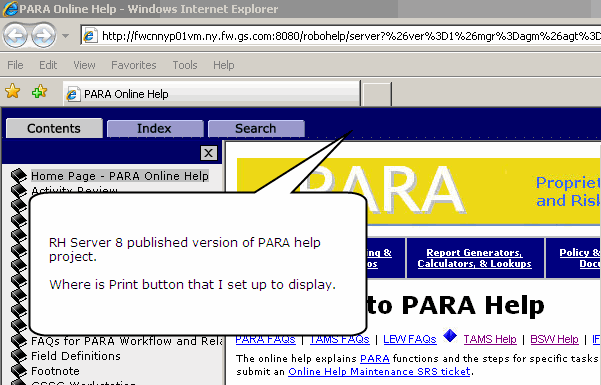
RH Server 8 version

  • When I view the same project after I publish it to the server, the Print button does NOT display.

QUESTIONS ARE:

How do I get the Print button to function properly (active printer dialog)?

If it can't work until it is published that fine but then how do I get it display when I view from server?
This topic is closed to new replies. Start a new post to keep the conversation going.

4 replies

pjvAuthor
Inspiring
October 15, 2009

Oops!  Didn't realize that I had to click the Edit for the inline script item.

It works now!!!

Thanks

RoboWizard
Inspiring
October 15, 2009

Hi there

Have you tried editing your Window Definition?

Click View > Pods > Project Setup

Cheers... Rick

Helpful and Handy Links

RoboHelp Wish Form/Bug Reporting Form

Begin learning RoboHelp HTML 7 or 8 within the day - $24.95!

Adobe Certified RoboHelp HTML Training

SorcerStone Blog

RoboHelp eBooks

johndaigle
Legend
October 15, 2009

Hi, Paula,

Be sure to check the Print Button property in the Windows Properties. I tested this and it works. If you would like to send me your Omega skin file, I'll take a look.

Thanks

John

John Daigle

www.showmethedemo.com

John DaigleAdobe Certified RoboHelp and Captivate InstructorNewport, Oregon
johndaigle
Legend
October 15, 2009

One more thing. Your screenshot shows the printAction() however it does not indicate whether you also put in the Inline JavaScript which defines the function that is called. Was this done?

Thanks

john

John Daigle

www.showmethedemo.com

WebHelpPRO-PrintBtn-JSFunction.jpg

John DaigleAdobe Certified RoboHelp and Captivate InstructorNewport, Oregon