
June 23, 2010
Question

RH7 HTML - Receive IE script error message when double-clicking link to auto-size pop-up

  • June 23, 2010
  • 1 reply
  • 1130 views

Hi, all,

Anybody ever seen this situation? When double-clicking on a link to an auto-size pop-up, I get the following Internet Explorer script error message:
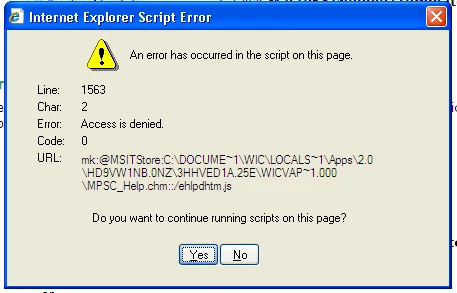
This error also occurs when I double-click the link in preview mode within the project. A colleague that is running the same version of IE with the same settings is not receiving this error. A couple of other co-workers are running a different version of IE, and one gets this error and one does not.

This error does not occur if you single-click the link (which you would normally do), nor does it occur if you double-click a link to a fixed-size pop-up. Once you receive this message and click Yes or No, the link sometimes works correctly when you double-click. I haven't been able to establish a pattern. Also, if you single click the link to display the pop-up, click off of it, and then double-click the link, the error does not occur.

As you can tell by now, this problem is kind of hard to pin down. I've done some research and I have yet to stumble upon anything that deals with this issue. Unless there is a solution out there, I can do one of two things: 1) change all of the auto-size pop-ups in the project to fixed-sized, which defeats the purpose of creating auto-size pop-ups, or 2) tell our customer not to double-click links.

Any advice you could give would be welcome.

This topic has been closed for replies.

1 reply

Captiv8r
Legend
June 23, 2010

Hi there

Indeed it has been reported on many occasions over the years. Unless someone like Willam has some way cool error detection magick with the scripts, the best approach we have always offered is this.

Educate your users on the way computers and HTML works. HTML works using SINGLE clicks, not DOUBLE clicks.

The reason for the error is because the first click caused the computer to launch a JavaScript command to open the sized popup. The second click that followed in rapid succession confused things by asking the script to stop what it was doing and run again.

Maybe it would help to explain it to your users like this. If you visited a restaurant and when the server asked what you wanted to order, would the become confused if you said to them: I'll have the T-Bone Steak and nearly immediately you repeated it by saying again I'll have the T-Bone Steak.

Cheers... Rick

Helpful and Handy Links

RoboHelp Wish Form/Bug Reporting Form

Begin learning RoboHelp HTML 7 or 8 within the day - $24.95!

Adobe Certified RoboHelp HTML Training

SorcerStone Blog

RoboHelp eBooks

June 23, 2010

Thanks, Captiv8r! Some of our folks here had the same suspicion about the JavaScript being confused. If nothing else, you've confirmed our suspicion. Also got a good chuckle out of your T-bone steak example.

My wife (who hates everything about computers) is a notorious double-clicker. I've tried many times to break her of the habit, but she's just two strong-willed. Maybe our users will be easier to train.

Thanks, again!

Ray