
Participant
January 26, 2011
Question

RH8 and FrameMaker9 not playing nicely together.....

  • January 26, 2011
  • 2 replies
  • 413 views

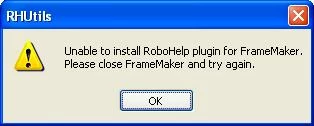
When trying to link a FrameMaker9 file into a project in RH8, I do not have the FrameMaker Document option under File|Link, I just have the Word document option. So I tried to import the FrameMaker9 file and received the following error:
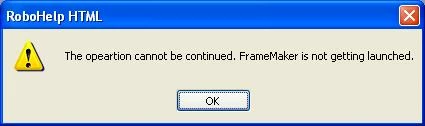
I opened existing RH8 projects that already had FM9 files linked/imported, and when I try to right-click and select Edit, I receive the following error:
I have perused all the posts out here in the Adobe Community and have tried several of the posted solutions, to no avail. I had a trial version of RH8 mid last year and then updated to the TechCommSuite 2.5 shortly thereafter. In reading other posts, I modified the maker.ini file with the following line:

RH4FMver9=Standard,RH4FMver9,C:\Program Files\Adobe\Adobe Technical Communication Suite 2\Adobe RoboHelp 8\RoboHTML\RHFrameMakerServer9.dll,all

I also uninstalled all Adobe products and re-installed, which took all day and did not change the result.

Are there any specific registry settings/files I should look for that could be locking up RH8 due to the old trial? Any help is greatly appreciated!!

This topic has been closed for replies.

2 replies

Participating Frequently
January 27, 2011

HI jla1515,

What seems to have happened is that your TCS licensing is not activated and your RoboHelp is acting like a point product and thus you are not getting options of FM integration feature !

Please do not uninstall and don’t do any cleanup of the registry as it seems to be surely a problem of licensing, as you had installed trial of Point product earlier so RoboHelp still remembers the same licensing just Open RoboHelp and FrameMaker individually and Deactivate the License (Help->Dectivate) and close both the products and then re-launch RH and use the TCS 2.5 key to activate it.

Everything should work properly after that.

Ashish Chandra Gupta

Jeff_Coatsworth
Community Expert
Community Expert
January 26, 2011

First - you should be posting this one in the FM Integration forum, not just the plain RH one.

Second - if you've got TCS2.5, then the fix you made to the maker.ini isn't correct - it has to reflect your path to TCS2.5 (not 2 as you've shown). The proof of success of this line is seeing the RH menu item appear in FM9.

Third - I'd be tempted to uninstall everything again, use a Registry cleaner and re-install. Or put a call into Adobe Support; install issues are usually freebie calls.

Since you don't mention anything about your O/S, I'll assume you're a local admin with full rights to your C:\ drive.