
March 7, 2011
Question

RH9 - how to create Context Sensitive Help automatically

  • March 7, 2011
  • 2 replies
  • 1504 views

I'm currently using RH8 HTML and am reading about upgrading to RH9. One of the appealing features is creating context sensitive help automatically.  Can't seem to get detailed info on this feature. Below is about the most info I could gather off Google. Can someone please direct me to a video or some kind of tutorial so I can see how this is done? Right now our map IDs are automatically generated. I believe the hex number is converted and then updated and stored in a .hm file. I look at the application window's title bar for the window name and match it up to what's in the .hm file. there's a little more to it but that's the gist of it.

Also, can I store topics in the improved resource manager? I'm trying to figure out if the resource manager will help with our single sourcing. We currently create symbolic links when we want to reuse content. Whole other subject.

Content I found thus far on context sensitive help in RH9:

An even bigger boost comes for those creating context-sensitive help. Open your application from within RoboHelp 9 and you can map dialog boxes to new or existing topics, with the necessary Help IDs extracted automatically. Some users will benefit greatly, but the target application must support RoboHelp’s new CSH API - currently only C++ APIs on Windows are supported.

Creating desktop application Context Sensitive Help (CSH) is now easier and automated. Context Sensitive Help topics can be mapped to C++ applications without any involvement from the Application Developer. This eliminates the dependency on developers. Authors can even test the CSH themselves in a time-efficient and smooth process.
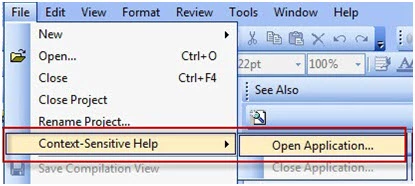
Creating desktop application Context Sensitive Help (CSH) is now easier and automated. Context Sensitive Help topics can be mapped to C++ applications without any involvement from the Application Developer. This eliminates the dependency on developers. Authors can even test the CSH themselves in a time-efficient and smooth process.

This topic has been closed for replies.

2 replies

Captiv8r
Legend
March 7, 2011

Hi there

I believe this function is rather limited. To the best of my knowledge, it only works if the application you are creating CSH for was created using C++ AND it was compiled using the RoboHelp API.

Assuming you cross that hurdle, what you do is start the application from RoboHelp 9 by clicking File > Context Sensitive Help > Open Application. Once the application opens, you browse to a dialog where you wish to create Context Sensitive Help and press F1. At that point, RoboHelp HTML should then present the CSH Options dialog where you may choose Mapping Options and Topics to map to. Make your choices and click OK. From there it's a bit of a mystery as I was testing this while logging the steps and RoboHelp crashed on me. Sorry

Hopefully this provides you a clue as to how it works.

Cheers... Rick

Helpful and Handy Links

RoboHelp Wish Form/Bug Reporting Form

Begin learning RoboHelp HTML 7, 8 or 9 within the day!

Adobe Certified RoboHelp HTML Training

SorcerStone Blog

RoboHelp eBooks

March 7, 2011

Thanks, Rick.

How about the Resource Mgr for storing resusable content? Can I add topics to the Resource Manager and use them throughout projects? I see I can use images, snippets, etc, but didn't see anything about topics. We currently have common topics we include via symbolic links for all of our 10+ RH projects. We create one source directory and then symbolically link that directory to each project.  Just wondering if Resource Manager will help eliminate the need for symbolic links.

Captiv8r
Legend
March 7, 2011

Hi there

Interesting question because I recall raising that exact issue during beta and Adobe acted as if I were crazy for suggesting it.

Certainly the Resource Manager in RoboHelp 9 allows you to define an HTML file type, but that's where it falls flat. You may define the file type and even copy from the common location to your project, but it refuses to behave the same way it does with Images or Snippets or the like. It will not monitor changes to the topic on either side of the fence.

All I can do is urge you and anyone else that thinks it should be implemented to saturate Adobe with Wish Form requests to see this changed.

Cheers... Rick

Helpful and Handy Links

RoboHelp Wish Form/Bug Reporting Form

Begin learning RoboHelp HTML 7, 8 or 9 within the day!

Adobe Certified RoboHelp HTML Training

SorcerStone Blog

RoboHelp eBooks

Jeff_Coatsworth
Community Expert
Community Expert
March 7, 2011

You might want to check out Peter Grainge's site for info on CSH (www.grainge.org)

March 7, 2011

Thanks, but I didn't see anything specific to RH9 and CSH on Peter's site.