

tracym11665964
Known Participant
April 15, 2020
Question

Robo 2019 (New UI) Header Bar Search Results Drop-Down List Colour

  • April 15, 2020
  • 4 replies
  • 435 views

My final problem to solve on trying to make the design of my help system match the web application is the colour of the search results that appear when you enter search text in the Header Bar Search field. I'm producing Responsible HTML5 using the Azure Blue skin (significantly edited).


Currently, it seems to default to black which is simlar to the colour of the drop-down list and I can't see where to change it.
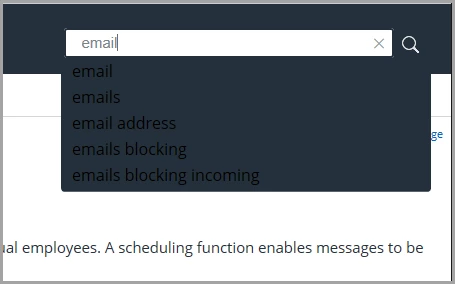


Any ideas?


Thanks


Tracy

    This topic has been closed for replies.

    4 replies

    tracym11665964
    Known Participant
    April 16, 2020

    Than you so so much for your help Amebr. That wokred perfectly. My help file is now looking exactly as I want it to thanks to yours and Peter's help.


    Thank you very very much,


    Tracy

    Community Expert
    April 16, 2020

    Try div.search-list { color: white; } in the custom css in your skin.


    Or if you want to only target the desktop view: body.media-desktop div.search-list { color: white; }


    Do note it'll also change the text colour in the search dropdown in the lefthand side panel; I'm not sure if you want that? It should be possible to limit it but I'd need to dig a bit deeper.

    tracym11665964
    Known Participant
    April 15, 2020

    Thanks very much Peter - it's not a perfect solution (which would be a different colour text for the drop-down to the text in the search box) but it's more than workable and I hadn't thought of doing that so very much appreciated.


    I'm about to send the design to the Product Manager so am keeping my fingers crossed and am offering very many thanks to you and Amber 🙂

    Peter Grainge
    Community Expert
    Community Expert
    April 15, 2020

    It is controlled by Background which I think you have set to black.


    Green gave me this.


    I then changed Background to this. (Select No Colour in the colour chart)


    Still a black background before you enter anything in the search field but this when you do.


    You can set a colour for the input field but not the dropdown. If that is also a requirement, you are on your own. 🙂


    Unless Amber can come up with another excellent fix. 🙂


    Use the menu (bottom right) to mark the Best Answer or Highlight particularly useful replies. Found the answer elsewhere? Share it here.