


Participant
November 1, 2023
Question

ROBO Help 2020 - Invalid Destination Path

  • November 1, 2023
  • 2 replies
  • 197 views

I am new to robiohelp and have minimal knowledge.


I have user who just updated their workstation with robohelp 2020. 

There were multiple issues witht he config we were able to figure out but when we go to publish updates to an iis server using a share folder, publish profile is setup as a filesystem with the destination path \\servername\sharefolder, it will act like it is publishing and then throw an invalid destination path error. 
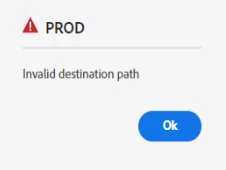
I'm not sure why this is happening, i can manually copy files from the workstation to the share folder but robohelp keeps throwing this error.  

Does the app use our creds when making the connection to the share folder on the remote server or is it using a local account? 

I looked in the logs but i'm not seeing anything saying there is an issue. 


any suggestions on what to look at would be appreciated. 

    This topic has been closed for replies.

    2 replies

    Peter Grainge
    Community Expert
    Community Expert
    November 1, 2023

    Sorry. you did say you could manually transfer.


    I see in a new profile the server directory uses forward slashes. Above you specify back slashes. 


    If the issue is not one of those fields, have you tried SFTP. Maybe the server requires that. Beyond that and unless anyone else comes forward, I suggest for this one you need to go to Adobe Support. See https://helpx.adobe.com/contact/enterprise-support.other.html#robohelp for your Adobe Support options. The email link tcssup@adobe.com is recommended as it reaches a team dedicated to Technical Communication Suite products including RoboHelp.

    ________________________________________________________

    My site www.grainge.org includes many free Authoring and RoboHelp resources that may be of help.


    Use menu (bottom right) to mark as Best Answer or to Highlight particularly useful replies. Found the answer elsewhere? Share it here.
    Peter Grainge
    Community Expert
    Community Expert
    November 1, 2023

    Can they access the folder in File Explorer? 

    ________________________________________________________
    My site www.grainge.org includes many free Authoring and RoboHelp resources that may be of help.


    Use menu (bottom right) to mark as Best Answer or to Highlight particularly useful replies. Found the answer elsewhere? Share it here.
    Participant
    November 1, 2023

    yes, myself and the user are able to get to the sharefolder through windows exploer and manually copy the files over. we just can't publish with robohelp.