
Participant
January 28, 2016
Question

RoboControl issue

  • January 28, 2016
  • 2 replies
  • 447 views

Hi,

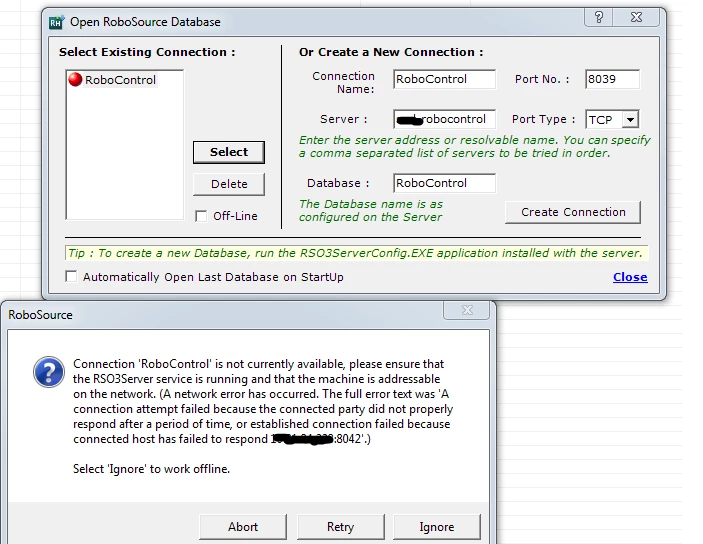
I am receiving the following error when I try to connect to the robocontrol server.

I checked and the service is running, a netstat -a shows that port 8039 and 8041 is listening.

I added a rule in the firewall (this client/server are in the same network). When I use Nmap and scan the server port 8039 and 8041 do not show up.

Any ideas what could be causing this error?


Thanks.
This topic has been closed for replies.

2 replies

johndaigle
Legend
January 28, 2016

Hi, triplelkorn.

While someone else may have seen this, I have not encountered this problem. Because of the uniqueness of your particular network, database setup, etc., it would be best to call or email Adobe Technical Support:
Adobe Technical Communication Customer Support

Be sure to have your license number, version of RoboHelp, and the particular database version you are using (SQL Server, Oracle, etc.) and the OS and version you are using for the Server.

Also, be sure to check out a "fix" that was distributed for 64-bit servers.

Can't check in files | RoboSource Control | 64-bit machines

You might also check out the video mentioned below.

How to install, configure, and use Adobe RoboSource Control?

See the video tutorial: RoboSource_Control_video_tutorial

Useful Links

Note: If any of the above links does not work, copy and paste it in the Windows Explorer’s address bar (Start -> Documents).

Submitted by: Vikram Gaur, Tech Support Engineer

John DaigleAdobe Certified RoboHelp and Captivate InstructorNewport, Oregon
Captiv8r
Legend
January 28, 2016

Moved to the RoboHelp Source Control forum category