
tejaswinik63269970
Participating Frequently
May 15, 2020
Question

RoboHelp 10 - disable the Close button and retain ToC

  • May 15, 2020
  • 6 replies
  • 1396 views

Hi,

I am using RoboHelp 10. Please let me know whether there is any provision to remove the Close button (x) in the left navigation pane that is ToC, and retain only the Table of Contents (ToC).
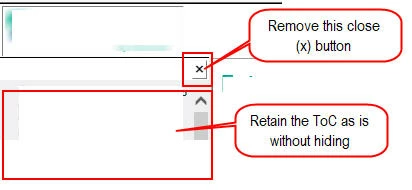
See the attached screenshot, for reference.

This topic has been closed for replies.

6 replies

Community Expert
May 22, 2020

Not as far as I know, sorry.


(In the olden days when I used webhelp 🙂 , I modified the width of the toc pane using a similar method, and copied a saved version of the file into the output directory after every generation. I think some people created .bat files to do it more or less automatically, but I didn't have the skills or a friendly developer then.)

Peter Grainge
Community Expert
Community Expert
May 21, 2020

Thanks for the explanation.


Use the menu (bottom right) to mark the Best Answer or Highlight particularly useful replies. Found the answer elsewhere? Share it here.
Community Expert
May 21, 2020

The screenshots attached show the wrong text file has been opened. 🙂

tejaswinik63269970
Participating Frequently
May 21, 2020

Thanks for the reply!

Is there any permanent solution for this? Are there any settings where I could hide the close button before generating the output? Because each time I generate the output and then manually, I need to edit the whskin_mbars file.

Peter Grainge
Community Expert
Community Expert
May 19, 2020

It's your call but I'm curious as to why you would want to disable this. I leave it to the user to decide how they want to view things rather than forcing my preference.


Use the menu (bottom right) to mark the Best Answer or Highlight particularly useful replies. Found the answer elsewhere? Share it here.
tejaswinik63269970
Participating Frequently
May 21, 2020

Thanks, Amebr for the suggestion!

Option1: Hiding close (x) button may create confusion because if a user clicks that button unknowingly and doesn't know about how to open the ToC then it can be challenging for that user to reopen the ToC (in case he/she does not know to click the Contents button).

Option2: In RoboHelp 10, in the whskin_mbars.htm file in a text editor, the suggested string is unavailable. For more information, see the following attached screenshots:

a. 

b. 

Community Expert
May 19, 2020

Sorry for the delay getting back to you. The forum notifications are broken and there's no way to tell which posts have had replies since last I visited.


You could just change the image to a blank image (e.g. a 1x1 transparent gif), however, if people hover over they'd still be able to click on the spot to close the navigation pane.

I don't have RH10, but I don't think this has changed.


Or, there's a manual process you can follow every time you generate, which will completely remove the button. From Skinny on Skins by @Captiv8r:


1. Generate your output.

2. In the output folder, open the whskin_mbars.htm file in a text editor (e.g. Notepad)

3. Find the line starting with addButton("hide2", and delete the entire line. When you run your help, the close button will be gone.

4. Save a copy of this file in a safe location. The generation process creates this file afresh every time you generate, so your changes will be lost.


You need to copy this file back in to your output every time you generate. (or make the same change every time you generate.)

Community Expert
May 15, 2020

Which output are you generating and which skin?

tejaswinik63269970
Participating Frequently
May 15, 2020

WebHelp (Primary Layout)

Default simple screen. I needed to update a few colors (background colors) otherwise the basic skin setting is as-is.