Participating Frequently
December 5, 2012
Question

RoboHelp 10, not publishing glossary terms in selected format

  • December 5, 2012
  • 2 replies
  • 804 views

I'm creating a project using a WebHelp layout in RoboHelp 10. In this project, I'm using the Glossary Hotspot Wizard to link key terms and definitions. After running the Glossary Hotspot Wizard, the applied format shows correctly in the project. However, when I publish the project, RoboHelp is not applying the select format.

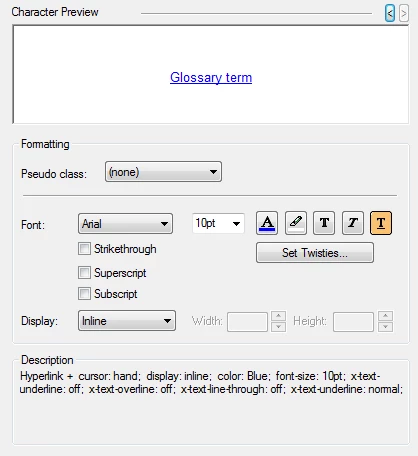
This is the Style format used:

This is how a sample glossary term appears in my project, prior to publishing:

This is the raw HTML code:

Finally, this is how the term appears in my published project output:

The hotspot is still there and clickable, but the formatting has not been applied. The problem here is that the user wouldn't know to click on the word unless they move their mouse over the it.

Why would RoboHelp would overwrite my selected format like that during published, and is there any fix?

This topic has been closed for replies.

2 replies

RoboColum_n_
Legend
December 7, 2012

Can you create a new project and test whether this happens with the default style sheet. If it doesn't import your style sheet and report back what happens.

RoboColum_n_
Legend
December 6, 2012

Hi R Tomchuk and welcome to the RH forums.

Can you start by telling us where you are publishing to. Is it a server? What type of server? The fact that you can see the hotpost operating as you expect in the generated output (which presumably on a local or network drive) suggests that there is something on that server that is affecting things. Do you have another server location you can publish to to check this theory out?

R TomchukAuthor
Participating Frequently
December 6, 2012

Thank you for responding!

We normally publish to SharePoint, which is the platform our internal company sites run on. However, I did attempt to publish to a local network server and got the same results. The problem also occurs if I publish to my own hard drive.

Also, I recently upgraded to RoboHelp 10. Prior to that, I did not encounter this issue in 9.