
toscar182
Known Participant
October 11, 2016
Question

Robohelp 11 & 2015 html5 responsive output problem

  • October 11, 2016
  • 6 replies
  • 1522 views

Hi, i'm using robohelp 11 and i have a problem with my output in HTML5 using microsoft EDGE browser, before the update to anniversary update(Microsoft Edge ver. 38.14393.0.0).

when i open my project i can't see the contents in the left column.
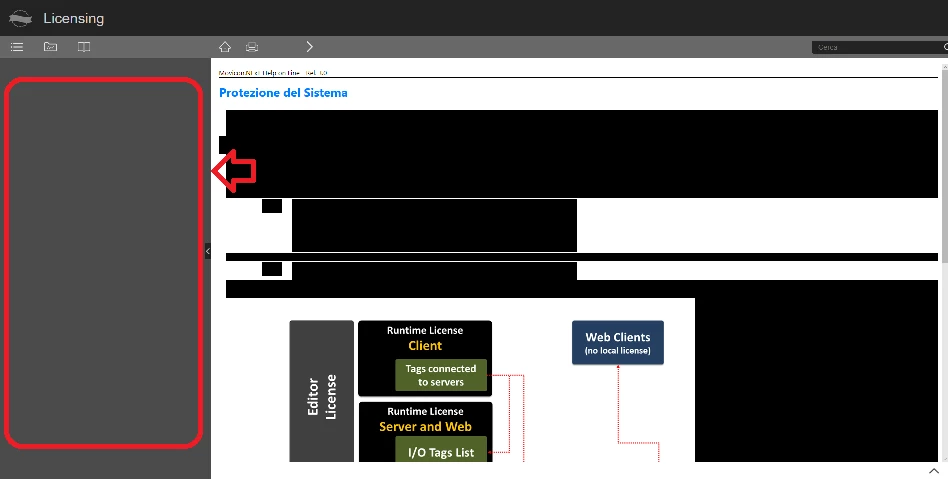
with other browsers the problem does not exist...

I downloaded also the free trial version of RH2015 to try to solve the problem, but the result is the same.

any suggestion fom me??

thx

This topic has been closed for replies.

6 replies

toscar182
toscar182Author
Known Participant
December 30, 2016

Thanks jeff...I solved the problem by changing the "Internet Options" from the "control panel" (add in the trusted sites my publishing address)...in Edge ther's not way to change the trusted site options...but for the local path publishing the problem it's a little more complicated.

Jeff_Coatsworth
Community Expert
Community Expert
December 30, 2016

A quick Google just revealed that Edge doesn't directly expose a way of adding a Trusted Site, but that you can backdoor it by using IE11 to add the location first; then Edge doesn't kick up a fuss about it afterwards.

Participating Frequently
December 29, 2016

I've the same problem, even with last RoboHelp update (12.0.4.460) ... but I've found the solution.

The issue happens when the URL is a local path like this (with the drive unit specified "K:"):

file:///K:/project/HelpHTML/!SSL!/Responsive_HTML5/index.htm

instead, this path works well:

file://mynas/project/HelpHTML/!SSL!/Responsive_HTML5/index.htm

Jeff_Coatsworth
Community Expert
Community Expert
December 29, 2016

I forget if it applies to Edge, but I found that making the browser treat a local or network LAN drive as a "Trusted Location" made my help appear on earlier versions of RH and IE with my WebHelp projects. It probably applies to Responsive HTML5 too.

Captiv8r
Legend
December 29, 2016

And to make it a "trusted location" you would?

toscar182
toscar182Author
Known Participant
December 22, 2016

sorry if I answer only now but I resolved the problem by using the webhelp classic uotput

, hoping, in the meantime in a possible fix.

With the last update, however, I noticed that the problem of incompatibility with Edge and Html5 output  still persists ...

in addition to the images attached, if you need it, I can possibly send you an example project...

thx

Thomas

Jeff_Coatsworth
Community Expert
Community Expert
December 22, 2016

Try generating responsive help using one of the sample projects that ship with RH2015 & test it in Edge. If that doesn't work, then log a bug in the Bugbase (Feature Request/Bug Report Form ) to get it on Adobe's radar.

toscar182
toscar182Author
Known Participant
October 12, 2016

before the update the result is this:

What do you mean by "services releases"? how i can apply these?

thx

thomas

Jeff_Coatsworth
Community Expert
Community Expert
October 12, 2016

Help > Updates usually works, but you can visit the patches page directly by going to Adobe - Support : RoboHelp Support Center : Service Releases

Captiv8r
Legend
October 11, 2016

Hi there

From RoboHelp 2015, did you apply the service releases? Those are rather important for situations like this.

Cheers... Rick

Jeff_Coatsworth
Community Expert
Community Expert
October 11, 2016

Make sure you update the RH2015 version you just downloaded - it doesn't contain all the fixes that have been released since then. Then try regenerating your help to test it on Edge.