
Participant
February 20, 2015
Question

Robohelp 11 not Linking or Importing .docx or docm

  • February 20, 2015
  • 1 reply
  • 639 views

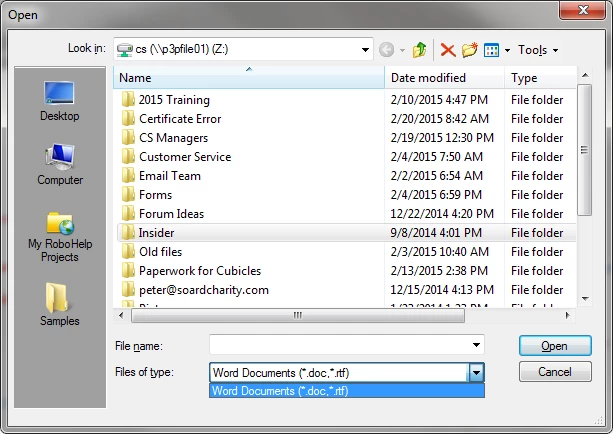
I just got RoboHelp 11 installed. I specifically upgraded to allow me to link my many Microsoft Word 2007 and Microsoft Word 2010 since RoboHelp 8 will not allow you to .docx files.  When I try to link there Word docs, it only shows me options for .doc and .rtf files (as shown below). I have the Microsoft Office 2010 suite installed and usable on my computer.  As the tutorials state:

You can create a RoboHelp project by importing a Word document. To import Word files, you must have Microsoft

Word installed on your computer.

Note: DOCX and DOCM formats are not supported by versions earlier than Microsoft Word 2007. See Microsoft Word

I was able to create a new project using a .docx file, but even that project once created shows this same window without the .docx and .docm options when linking or importing new Word Documents.

Is there a setting or an update that is needed to allow me to select .docx file types for Linking and Importing?
This topic has been closed for replies.

1 reply

Willam van Weelden
Inspiring
February 23, 2015

That's strange. Do you have both 2007 and 2010 installed? Do you perhaps have the x64 version of Office installed?

Can you try the following?

  1. Create a new blank project (not based on a Word document).
  2. Go to File > Import > Word document.

Can you import .docx from there?

Kind regards,

Willam

Participant
February 24, 2015

That is the other bizarre part. When I create a new project, it will let me choose a .docx file to import only as the first page of the project. Even if I start if off with the .docx file or a blank project, adding (linking or importing) any additional Word Documents only gives me the *.doc and *.rtf.

I have only Microsoft Office 2010 suite 32-bit installed.

Peter Grainge
Community Expert
Community Expert
March 3, 2015

When you go to open a document in an existing project as in your first image your dialog is only showing DOC and RTF whereas in the second image all the required options are showing. So the question has to be what is different and one possibility is that in the first you are browsing to a network and in the second you are browsing locally.

Try copying the document you were trying to link to / import to your local drive and then try to link. Are the options then different? If yes, I would suggest a chat with your network guys.

Let us know how that goes.


See www.grainge.org for RoboHelp and Authoring tips

@petergrainge

Use the menu (bottom right) to mark the Best Answer or Highlight particularly useful replies. Found the answer elsewhere? Share it here.