
Participant
June 8, 2017
Question

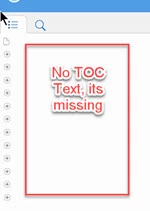
RoboHelp 15 Responsive HTML5 Icons display but No TOC

  • June 8, 2017
  • 2 replies
  • 440 views
  1. I attempted to rename my project and accidentally included a character (&)  in the project name.
  2. Then updated the project name again to remove the character
  3. The TOC displays with icons but no text.
This topic has been closed for replies.

2 replies

gv5372Author
Participant
June 8, 2017

THE PROBLEM:

  • Changing the project name and including the ampersand (&) 

THE FIX:

  • Eliminated the ampersand from project name and spaces
  • Tested by selecting a new layout that it was layout
  • Selected the original layout from the Gallery and changed the name

Thanks to all that replied, greatly appreciate your suggestions Peter.

Captiv8r
Legend
June 8, 2017

Hi there

I recall from way back that renaming a project can change the TOC name too. When you changed the name back, have you ensured the TOC isn't still holding onto the ampersand version?

Cheers... Rick

gv5372Author
Participant
June 8, 2017

I deleted all TOCS listed in the project manger and created a new one. I'm afraid I've tried a few things and may be kinking this up even worse.

Captiv8r
Legend
June 8, 2017

Question here

The text is likely present but you just cannot see it. If you click and drag the mouse to select it, does it show then? Or if you click where the text should be, does the link work?

Assuming it does, you have likely configured the text color to match the background color. And to fix that, you just make an edit to the layout.

Cheers... Rick