Resuelto
Robohelp 2015 baggage files problem
When I was using RH11, I was able to drag and drop a baggage file into the Table of Contents; however, RH 2015 won't let me.
Anyone know why not? Is it possible?
Thanx,
Lon

When I was using RH11, I was able to drag and drop a baggage file into the Table of Contents; however, RH 2015 won't let me.
Anyone know why not? Is it possible?
Thanx,
Lon
Hi there
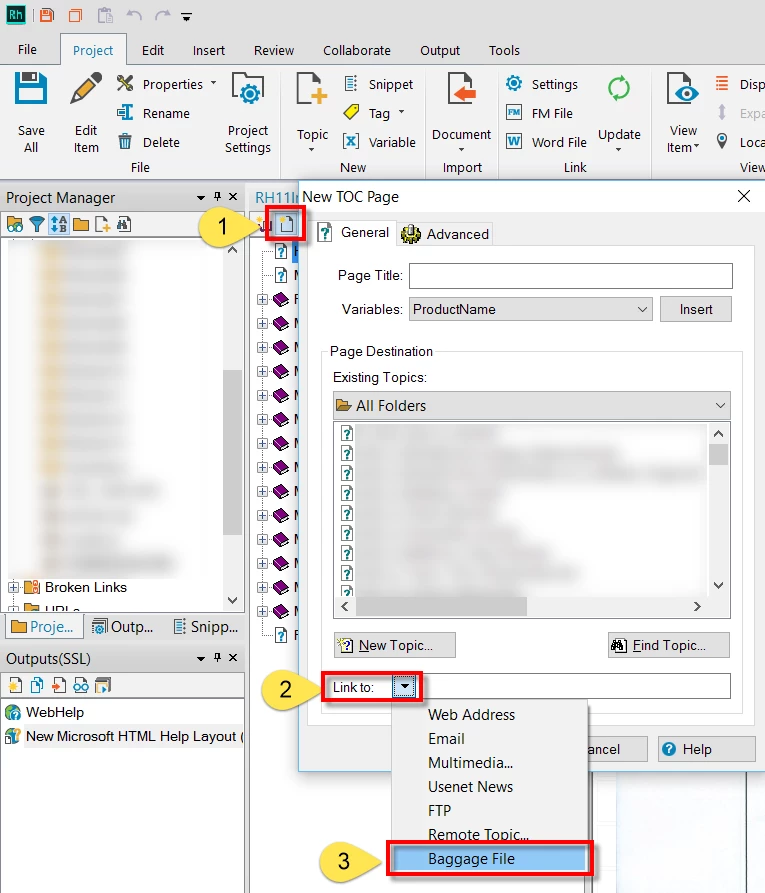
I just tested in my own 2015 and sure enough it disallows dragging and dropping. I'd call it a bug myself. The workaround is to add a page, then point the page to the baggage file.
From the TOC designer, click the Page icon. Then click the drop-down to select Baggage File.
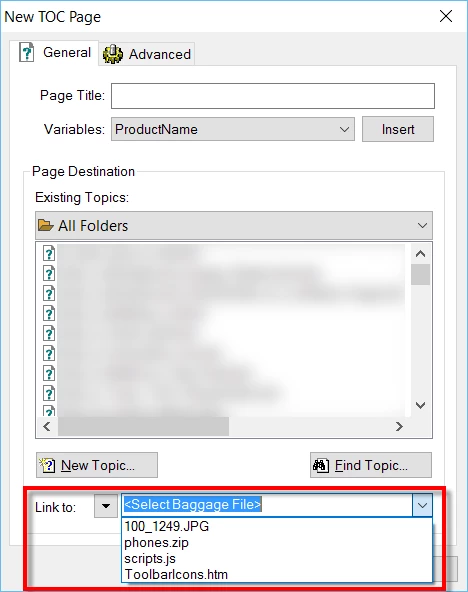
That will change the drop-down so it lists Baggage Files. From there, you click the drop-down and choose the Baggage File you want.
Cheers... Rick 
Enter your E-mail address. We'll send you an e-mail with instructions to reset your password.


 AdChoices