
Participating Frequently
March 4, 2016
Answered

RoboHelp 2015 cpd Project File is Corrupt

  • March 4, 2016
  • 1 reply
  • 1125 views

Hello Community!

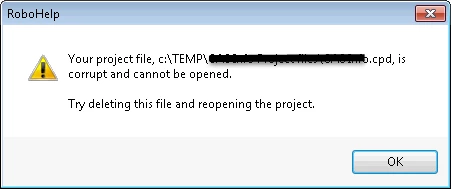
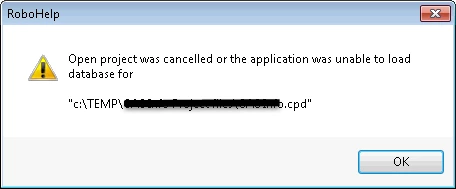
Hoping someone might be able to help with this urgent issue. All of a sudden, my.cpd project file has been corrupted and cannot be opened. Nothing out of the ordinary happened overnight to cause this error in the morning. Other project files open fine, but the main project I always work in has now become corrupt and RoboHelp 2015 says that it cannot be opened.

Has anyone ever experienced this before? Any tips to look through before contacting Adobe directly would be much appreciated.

I have backups of the .cpd that I could load. To bring in the most up to date htmls though, is there any quick way of doing that besides dragging and dropping each individual topic page into the older version of the .cpd?
This topic has been closed for replies.
Correct answer Peter Grainge

The XPJ is what you use to open a project. The CPD is a cache that rebuilds

if not present.

1 reply

Peter Grainge
Community Expert
Community Expert
March 4, 2016

Just delete the CPD in File Explorer and then reopen the project.

Use the menu (bottom right) to mark the Best Answer or Highlight particularly useful replies. Found the answer elsewhere? Share it here.
Participating Frequently
March 4, 2016

Hi Peter,

Sorry for my lack of experience here, but if I delete that CPD file, how do I go about reopening the project? The CPD is the project?

Peter Grainge
Community Expert
Peter GraingeCommunity ExpertCorrect answer
Community Expert
March 4, 2016

The XPJ is what you use to open a project. The CPD is a cache that rebuilds

if not present.

Use the menu (bottom right) to mark the Best Answer or Highlight particularly useful replies. Found the answer elsewhere? Share it here.