
Inspiring
August 26, 2015
Answered

RoboHelp 2015. Generated master project doesn't recognize subcategories in index keywords.

  • August 26, 2015
  • 2 replies
  • 521 views

I have a master project that houses external links to many projects (over 70) and all index entries combine to create a master index for the help system. After I upgraded to RH2015 and I have generated both the sub-project and the master project, the keyword/subkeyword relationships have disappeared. Index entry keywords are listed without any subcatgories although the project has them. Like this:
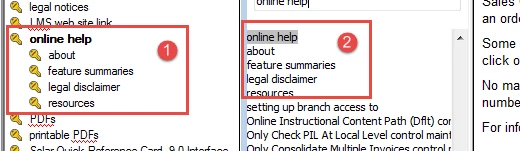
So, now I have a giant list of keywords without the indentations to delineate the keyword groups. I did much of the index by hand using the Topic Properties and the "keyword\subkeyword" format. Has that delimiter changed? Anyone know or have the same issue? Am I missing a simple setting some place?

I've been through the What's New and Forums here, but am not seeing anything.

Thanks in advance.

This topic has been closed for replies.
Correct answer surbhi_maheshwari9120543

Yup, looks like this issue is in the patch that just came out:

Resolved issues


Hi,

I have tried it with the latest patch applied RoboHelp and it is working fine at my end.

Index looks fine in the WebHelp output.

We have fixed this bug in the latest patch release. Please make sure that you have updated the RH. Latest build after applying patch would be 12.0.1.338

For applying patch, go to Help>updates and apply the update available.

If after applying patch also, you face this issue please post here.

Thanks,
Surbhi Maheshwari

2 replies

Inspiring
August 28, 2015

Thanks, all, yes, the patch worked!

Inspiring
August 27, 2015

According to a separate post this is a known issue...anyone know of an ETA on the patch from Adobe?

Jeff_Coatsworth
Community Expert
Community Expert
August 27, 2015

Have you tried the latest one that they released this week?

Community Expert
August 28, 2015

Yup, looks like this issue is in the patch that just came out:

Resolved issues