

burnettejacobHSUSA
Inspiring
November 2, 2015
Answered

Robohelp 2015 - The Page Cannot Be Found

  • November 2, 2015
  • 1 reply
  • 1059 views

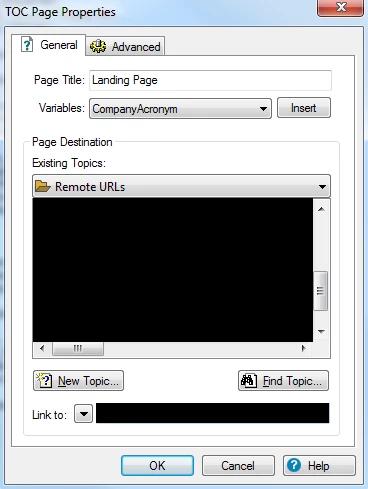
I am trying to create a topic that links to a webpage in Robohelp 2015 using the responsive HTML5 output; however, whenever I view the output and select the topic, I get the error listed below the TOC Page Properties screenshot. The link works if I paste it into a browser, though. Can anyone help me understand what I'm doing wrong? I often do this in Robohelp 10.

Additional info: I want this webpage to be displayed without opening in a separate window.

Thanks in advance for your help!

   Where I'm pasting the web address
ERROR

The page cannot be found

The page you are looking for might have been removed, had its name changed, or is temporarily unavailable.

Please try the following:

  • Make sure that the Web site address displayed in the address bar of your browser is spelled and formatted correctly.
  • If you reached this page by clicking a link, contact the Web site administrator to alert them that the link is incorrectly formatted.
  • Click the Back button to try another link.

HTTP Error 404 - File or directory not found.
Internet Information Services (IIS)


Technical Information (for support personnel)
  • Go to Microsoft Product Support Services and perform a title search for the words HTTP and 404.
  • Open IIS Help, which is accessible in IIS Manager (inetmgr), and search for topics titled Web Site Setup, Common Administrative Tasks, and About Custom Error Messages.
This topic has been closed for replies.
Correct answer burnettejacobHSUSA

I figured it out. Rookie mistake. For anyone experiencing the same, click the drop down arrow next to "Link to:" and select web address. For some reason, Rh doesn't recognize that it is a web address unless you do this.

1 reply

burnettejacobHSUSA
burnettejacobHSUSAAuthorCorrect answer
Inspiring
November 2, 2015

I figured it out. Rookie mistake. For anyone experiencing the same, click the drop down arrow next to "Link to:" and select web address. For some reason, Rh doesn't recognize that it is a web address unless you do this.

Willam van Weelden
Inspiring
November 3, 2015

That's correct. Just one note: this isn't a RoboHelp problem. It's the browser that can't make out that you're linking to a web address. (Though RH could probably be more helpful by adding the missing information for you.)

Captiv8r
Legend
November 3, 2015

I'm wondering if Jacob simply pasted something like SomeSite.com into the hyperlink field. Seems when you do that RoboHelp doesn't really understand it needs other stuff. But if you paste www.SomeSite.com, RoboHelp then prefixes it automatically with http:// because it understands that www is linking to the web.

Note I'm generically referring to just pasting into the hyperlink dialog without specifically choosing the drop-down.

Cheers... Rick