chelluvsGod
Inspiring
April 9, 2021
Question

RoboHelp 2017 Do not understand how to add an index

  • April 9, 2021
  • 15 replies
  • 241 views

I have looked online and at the help within RoboHelp. I need specific instructions on how to create an index. I know you can do it manually and use the wizard but neither meet my needs. The wizard puts items in the index that simply make no sense, but doing it manually, I am unable to link to bookmarks, only topics. 


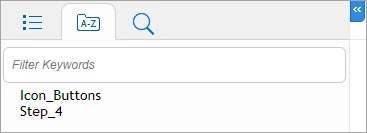
I have an empty index and there are a couple words displaying in the online output. Why are they displaying if I have nothing in the index?


Thank so much.

Michele
 

    This topic has been closed for replies.

    15 replies

    chelluvsGod
    Inspiring
    April 12, 2021

    Peter, 

    All of my bookmarks in the Project Manager and in the Topic List are highlighted blue. I cannot take a screen shot of the icon that shows when I try to drag and drop. It's a cirle with a slash through it, indicating I cannot perform that action.


    Is there some setting that is preventing to drag the bookmarks?


    I made a copy of  my project and removed the bookmarks. When I generated the output, the same phantom words show in the index. Sigh...I guess I'll just live with those. 


    Michele 

    Peter Grainge
    Community Expert
    Community Expert
    April 12, 2021

    Backup your project and then delete those bookmarks to see if that fixes it.


    I can drag from either of the locations outlined blue where you see the bookmark to the area outlined blue.


    ________________________________________________________
    See www.grainge.org for free Authoring and RoboHelp Information

    Use the menu (bottom right) to mark the Best Answer or Highlight particularly useful replies. Found the answer elsewhere? Share it here.
    chelluvsGod
    Inspiring
    April 12, 2021

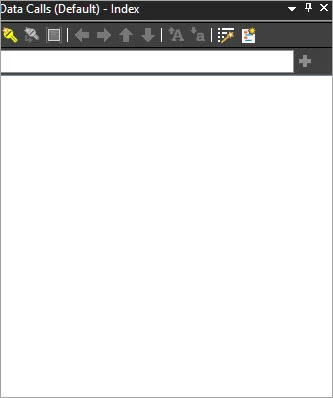
    I added a new Index and made it the defaul and deleted the old one. 

    I generated the output and the phantom words still display. 

    Icon Buttons and Step 4 are both booksmarks and they are withint different topics.


    As for bookmarks in the Index. I foudn two ways to add things. Add Keywords and Subkeywords using the Index Pod. From the Topic List I am able to drag topics to the Index however, I am unable to drag Bookmarks. 


    Also, if I add a keyword I am unable to drag a bookmark to it. 


    Any help on this is appreciated.


    Thanks again,

    Michele

    Community Expert
    April 12, 2021

    Just to confirm, there is only one index in your project? If there is more than one, check that Index field in the output (SSL) pod is set to either <Default Index> or Data Calls (based on your screenshot above).

    Peter Grainge
    Community Expert
    Community Expert
    April 10, 2021

    To add bookmarks open the Topic List and click the Show/Hide Bookmarks icon so that you can see your bookmarks.


    Then drag the bookmark to your keyword.


    I can't see what is causing the mystery keywords. Are they the title or content of any topic? Maybe create a new index and see if that works. If it does, set it to Default and delete the old one.

    ________________________________________________________
    See www.grainge.org for free Authoring and RoboHelp Information

    Use the menu (bottom right) to mark the Best Answer or Highlight particularly useful replies. Found the answer elsewhere? Share it here.