
olkkka
Known Participant
July 25, 2017
Question

RoboHelp 2017 - Indigo layout - title and subtitle text

  • July 25, 2017
  • 1 reply
  • 568 views

Hello,

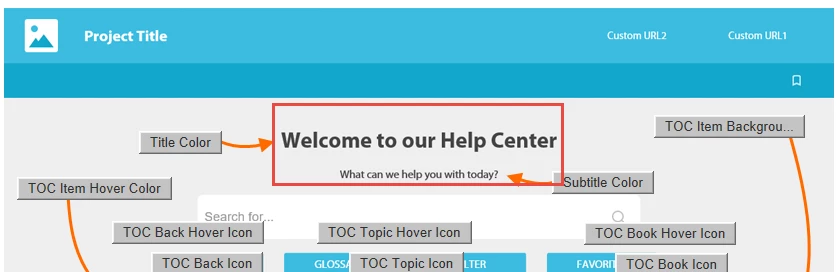
Could anyone help me with a way how to configure the Indigo layout home page Title and Subtitle text?

It's clear how to set up their colors, but how about the content, where do I update it?

It is possible to have several paragraphs of text here?
Thank you,

Olha

This topic has been closed for replies.

1 reply

Peter Grainge
Community Expert
Community Expert
July 25, 2017

Go to the Project ribbon and click Project Settings. On the General Tab, click Advanced and then Labels. Scroll down to Welcome Header and Welcome Text. Make your changes there.

There seems to be a limit of 243 characters for the text. That will be on two lines with the first longer than the second.


See www.grainge.org for RoboHelp and Authoring information

@petergrainge

Use the menu (bottom right) to mark the Best Answer or Highlight particularly useful replies. Found the answer elsewhere? Share it here.
olkkka
olkkkaAuthor
Known Participant
July 25, 2017

Peter, thanks a lot for a prompt answer. It works!