
Inspiring
April 17, 2024
Answered

Robohelp 2017- Indigo output

  • April 17, 2024
  • 8 replies
  • 1104 views

Hi,

I'm using Robohelp 2017, with the Indigo responsive HTML5 output. The texts below the menu bullets appear incomplete when they exceed the expected length. Is there a way for them to be displayed in full or on two lines? I'm attaching an image with an example of incomplete text
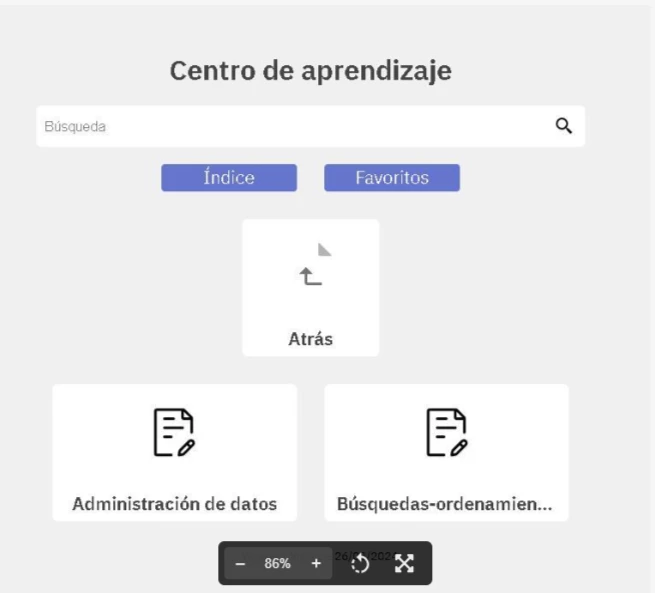


    This topic has been closed for replies.
    Correct answer Amebr

    I had a quick look at a RH2019 Indigo output. As you have RH2017, you'll have access to the screen layout css files.


    I think you need to unset the height, white-space, text-overflow, overflow and background-clip properties of div.frontpage-toc.grid-5 div span.label in at least 1 location in the layout.css file.


    Then you'll probably need to make more adjustments to the tiles, as unsetting the height will mess up that display.


    As always, inspecting the output to work out what needs to change is the way to go.

    8 replies

    Peter Grainge
    Community Expert
    Community Expert
    April 18, 2024

    You can trial it for one month. I think you have to give card details up front so make sure you cancel in plenty of time if you change your mind.


    There's a learning curve but I now hate having to look at Classic.

    ________________________________________________________

    My site www.grainge.org includes many free Authoring and RoboHelp resources that may be of help.


    Use menu (bottom right) to mark as Best Answer or to Highlight particularly useful replies. Found the answer elsewhere? Share it here.
    Inspiring
    April 18, 2024

    Thanks! I will see all of those themes in my project.

    Bye

    AmebrCommunity ExpertCorrect answer
    Community Expert
    April 18, 2024

    I had a quick look at a RH2019 Indigo output. As you have RH2017, you'll have access to the screen layout css files.


    I think you need to unset the height, white-space, text-overflow, overflow and background-clip properties of div.frontpage-toc.grid-5 div span.label in at least 1 location in the layout.css file.


    Then you'll probably need to make more adjustments to the tiles, as unsetting the height will mess up that display.


    As always, inspecting the output to work out what needs to change is the way to go.

    Peter Grainge
    Community Expert
    Community Expert
    April 17, 2024

    Might know. 🙂

    ________________________________________________________
    My site www.grainge.org includes many free Authoring and RoboHelp resources that may be of help.


    Use menu (bottom right) to mark as Best Answer or to Highlight particularly useful replies. Found the answer elsewhere? Share it here.
    Inspiring
    April 17, 2024

    Thanks a lot.

    I am new on this topics!!

    By

    Peter Grainge
    Community Expert
    Community Expert
    April 17, 2024

    You added the image so that it appeared as a link. That meant that anyone wanting to help you had to click the link to view it, then close it to reply. I added the image using the photo icon so that it can be seen as part of the post. 

    ________________________________________________________
    My site www.grainge.org includes many free Authoring and RoboHelp resources that may be of help.


    Use menu (bottom right) to mark as Best Answer or to Highlight particularly useful replies. Found the answer elsewhere? Share it here.
    Peter Grainge
    Community Expert
    Community Expert
    April 17, 2024

    To the best of my knowledge increasing the tile size to allow a large font to wrap was not an option. Later versions of RoboHelp offer frameless outputs with many more options for customisation. The current version is 2022.3. It is now a subscription only app and any context sensitive calls would have to change.


    The UI is also very different so there's a learning curve.

    ________________________________________________________

    My site www.grainge.org includes many free Authoring and RoboHelp resources that may be of help.


    Use menu (bottom right) to mark as Best Answer or to Highlight particularly useful replies. Found the answer elsewhere? Share it here.
    Peter Grainge
    Community Expert
    Community Expert
    April 17, 2024

    Please use the photo icon to insert images within the post. Seeing an image inline with the text makes it easier for anyone answering or viewing the post. I have edited your post to include the image inline.


    As far as I can see, the skin editor lets you change various properties but not the font. That said, I think there was a way to change it by editing some file. The person who might know is not currently online but hopefully will post later.


    Meantime try searching the forum for posts relating to tiles. Use the lower of the two search fields as that is specifically for RoboHelp.

    ________________________________________________________

    My site www.grainge.org includes many free Authoring and RoboHelp resources that may be of help.


    Use menu (bottom right) to mark as Best Answer or to Highlight particularly useful replies. Found the answer elsewhere? Share it here.
    Inspiring
    April 17, 2024

    Thanks!!!!

    I don´t understand what means  I have edited your post to include the image inline.

    I will wait for the person who knows about this theme.

    Tnaks again

    bye

    .

    Jeff_Coatsworth
    Community Expert
    Community Expert
    April 17, 2024

    You'd probably have to shrink the font size for all the text to fit on those buttons.

    Inspiring
    April 17, 2024

    Thank you. But I need to use large font, that's why I want to find a way for it to be fully readable.

    Jeff_Coatsworth
    Community Expert
    Community Expert
    April 17, 2024

    Don't think you can have it both ways unless you mess around with the button size or figure out a way to force a line feed in the text.