
Known Participant
June 8, 2018
Question

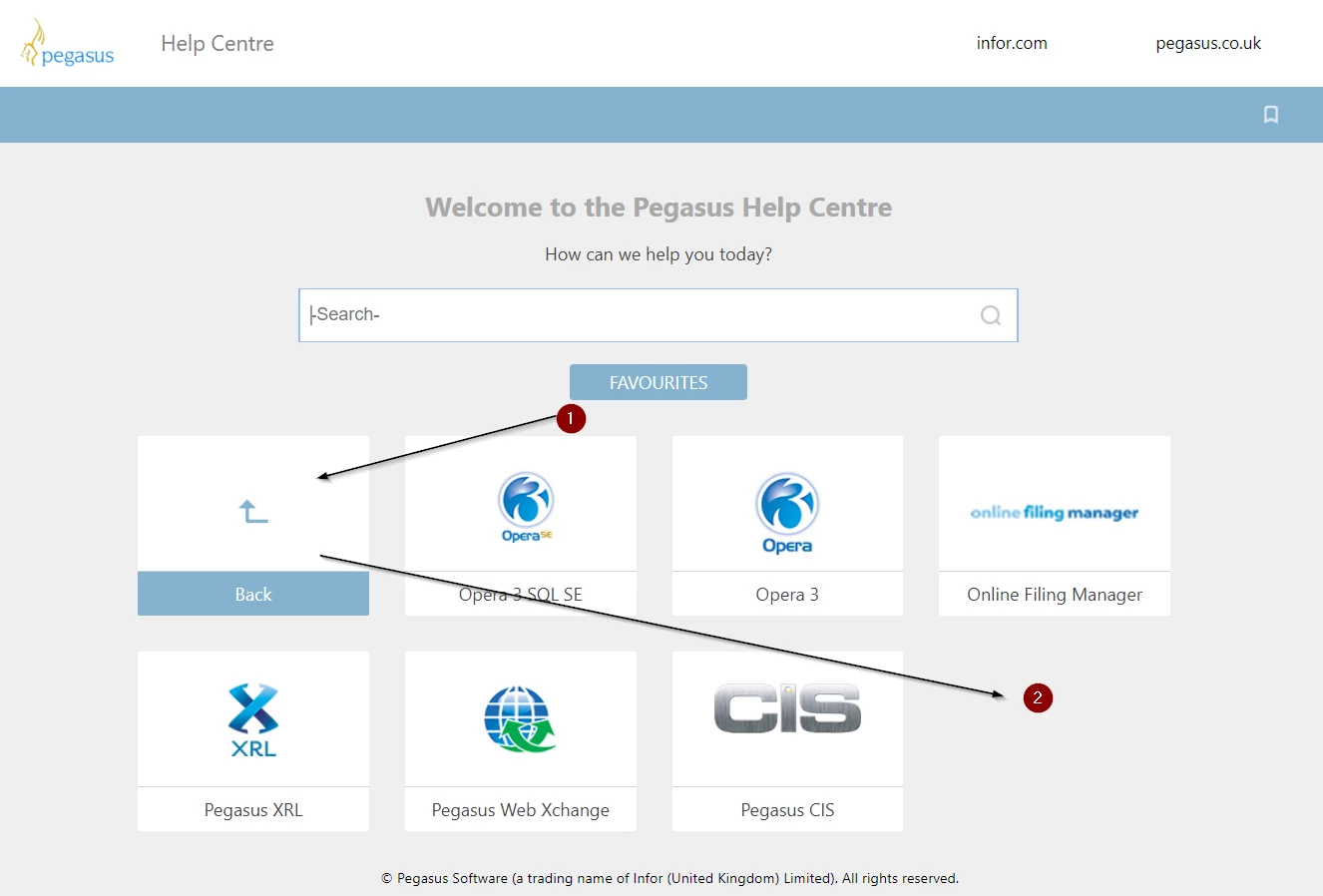
Robohelp 2017, Indigo, Responsive HTML5, moving the 'Back' button

  • June 8, 2018
  • 2 replies
  • 943 views

Hello,

Does anyone have any experience of moving the 'Back' button in the Indigo layout? The 'out of the box' position for the Back button is actually at the top of the page on its own line (position 1) but I've managed to work out how to change the CSS so that it isn't taking up an entire line by itself.

However, it's now displayed first when I would I would prefer it was displayed last (position 2).

Does anyone know how to move it to position 2?

Thanks,

David.
This topic has been closed for replies.

2 replies

Toxxyc
Inspiring
August 29, 2018

Hi DavidHutchinson​ would you mind sharing with me how you managed to move that back button to the in-line position?  I'm looking at trying something and I think it might solve an issue I'm having.

Known Participant
August 30, 2018

Busy this week but I'll make a note to check out the CSS next week and let you know.

Toxxyc
Inspiring
August 30, 2018

That would be amazing, thank you!  It's the one issue that keeps holding me back from implementing the "cover page" for my collection of documentation packs, and if it works like it should I could theoretically go as deep into structures using custom TOC images for every level as far as I'd want to go.

Looking forward to your reply!

Peter Grainge
Community Expert
Community Expert
June 8, 2018

In the later version of that layout, Adobe have moved the Back button to above the books on a line of its own. They did that because of issues reported when it was in the position in your older version.

I don't know what the issues were but I would be wary of moving it.

To use the new layout, select Indigo again from the gallery and give it a modified name Indigo2 for example. Maybe you could then compare the code of the two to see what changed.


See www.grainge.org for free RoboHelp and Authoring information.

@petergrainge

Use the menu (bottom right) to mark the Best Answer or Highlight particularly useful replies. Found the answer elsewhere? Share it here.