chelluvsGod
Inspiring
June 22, 2020
Question

RoboHelp 2017 - Recent Projects links do not work correctly.

  • June 22, 2020
  • 5 replies
  • 309 views

This issue started recently.


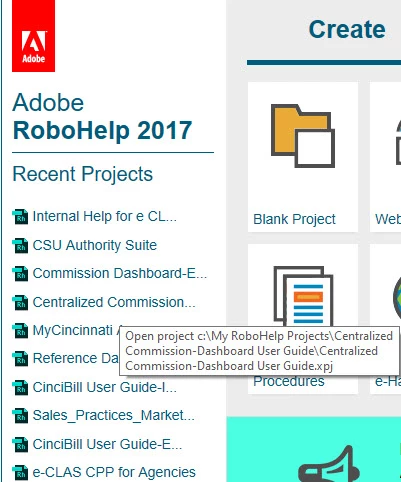
I open RoboHelp and the window displaying Recent Projects displays. When I click a link, a different guide opens than the one selected. 


I hover over a link and and display the hyperlink path.. I see it is correct and click on the project name, but it still brings up an incorrect guide.


See the attachments. Recent Projects Hyperlink shows what I'm tryiing to select. The Opened Guide shows what guide opened. There is no rhyme or reason as to what guide opens when I click a different link. It's been happening a few weeks now.


Thank you,

Michele


    This topic has been closed for replies.

    5 replies

    Peter Grainge
    Community Expert
    Community Expert
    July 1, 2020

    The only thing I can suggest is to uninstall, reboot and reinstall. It doesn't take long. Don't forget to update afterwards.


    Use the menu (bottom right) to mark the Best Answer or Highlight particularly useful replies. Found the answer elsewhere? Share it here.
    Peter Grainge
    Community Expert
    Community Expert
    June 23, 2020

    I led Jeff into the trap I fell into. You are not in a project at that point. Go for cleaning the list.


    Use the menu (bottom right) to mark the Best Answer or Highlight particularly useful replies. Found the answer elsewhere? Share it here.
    chelluvsGod
    Inspiring
    June 30, 2020

    Hello.


    I tried clearing the Recent Projects list again but this does not fix the issue.


    Thank you,

    Michele

    Jeff_Coatsworth
    Community Expert
    Community Expert
    June 23, 2020

    Yes, that's the one.

    chelluvsGod
    Inspiring
    June 23, 2020

    Good morning.

    I did try removing the the Recent File links within RoboHelp. That did not help.


    When you talk about deleting the CPD file, are you taling about deleting this (see screen shot) for each project?

    Thank you,

    Michele

    Peter Grainge
    Community Expert
    Community Expert
    June 23, 2020

    I can only think that somehow those links have got messed up. Try deleting the project's CPD file in Explorer and reopening the project.


    If that doesn't work go to File > Options > Recent Projects and delete one of them, then open that project through File > Open to recreate the link. See if it works then.


    Use the menu (bottom right) to mark the Best Answer or Highlight particularly useful replies. Found the answer elsewhere? Share it here.