Inspiring
March 20, 2017
Answered

RoboHelp 2017 Responsive HTML5 Indigo layout (Favorites)

  • March 20, 2017
  • 3 replies
  • 3186 views

Is anyone else encountering this regarding the Favorites feature in this layout?

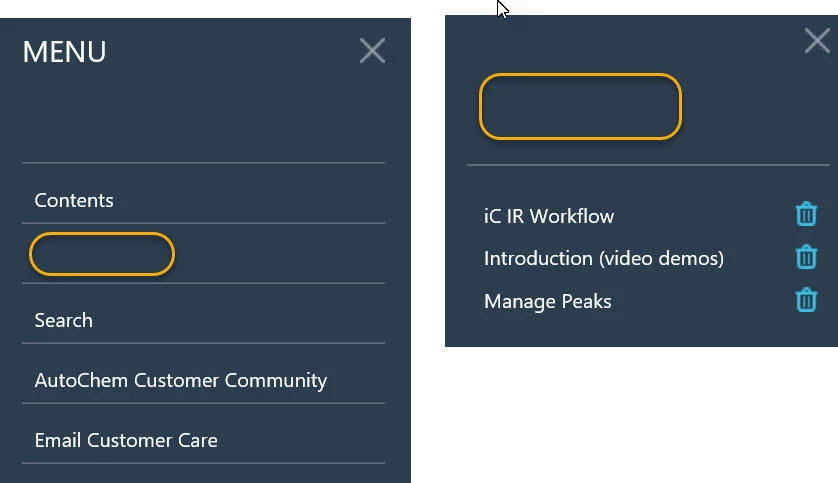
  • 'Favorites' button name is not appearing in the output on the Homepage; only an empty button.
  • After a couple favorites have been tagged, the title 'Favorites' also does not appear in the Favorites menu.

Windows 10, IE11

Thanks

This topic has been closed for replies.
Correct answer Willam van Weelden

Thanks Willam, for replying in the midst of an especially tight schedule!

Regarding the second issue: The issue occurs with two or three tagged favs or with none. The behavior is that the Favorites title itself does not appear--it's as if the color of the Favorites heading is the same as the background. Individual titles of favorite topics appear as you would expect (see below).

I think this problem has to do with the language file. On the front page of the Indigo Layout, do you see the welcome text? Or do you immediately get the search form?

In this case, can you try:

  1. Close RoboHelp.
  2. Backup the !Language! folder
  3. Remove the contents of the !Language! folder.
  4. Trash the CPD.
  5. Reopen RoboHelp and generate again.

When you do this, the language file gets recreated and you should now see the text show up. (Not on the button though, that's a different issue.)

IF this fails, you can also create a new project and copy the !Language! folder over to your existing project. That should also update the language resource.

3 replies

Inspiring
July 3, 2018

I just figured out how to resolve this one.

  1. Open the Project Settings.
  2. Click Advanced Language button.
  3. Select the Labels tab.
  4. Click Reset to Default.
  5. Scroll down to the [ResponsiveHelp] section. There is now a FavoriteBox Title=Favorites field.

This is where you can name it to what every you want. Hope this helps.

KFarrelly
Known Participant
April 4, 2018

I am using a trial of RH 2017 and experiencing the same Favorites issues noted in this thread. I want to try the answer noted in William's post (11 in this thread), but I don't understand what the 'CPD' is in Step 4. What is the 'CPD'?

  1. Close RoboHelp.
  2. Backup the !Language! folder
  3. Remove the contents of the !Language! folder.
  4. Trash the CPD.
  5. Reopen RoboHelp and generate again.
Jeff_Coatsworth
Community Expert
Community Expert
April 4, 2018

It refers to the your_project_name.cpd file in the project folder. It's safe to delete it because RH recreates it again if it's missing when you load the project.

KFarrelly
Known Participant
April 4, 2018

Thanks Jeff. I tried out the solution and the results look good. It also fixed something I hadn't realized was missing. On the main/home page of help, there's now a 'Welcome to our Help Center' header and 'What can we help you with today?' sub-header above the Search field. That text wasn't showing up in output that I had generated before trying out the fix noted in this thread. 

Jeff_Coatsworth
Community Expert
Community Expert
March 20, 2017

Does the same behaviour happen if you use one of the other layouts?

Inspiring
March 20, 2017

If I understand the new layouts correctly, the 'Favorites' feature is only in the new Indigo layout. Still learning...I could be wrong.

Inspiring
March 20, 2017

Here is something worth understanding from the HTML code. Why does it say aria-hidden for the favoritesLabel?:

<div class="header-nav">

  <div class="header-align">

   <div class="favorites sidebar-button" id="favorites-toggle-button-header"

     data-if="@KEY_SCREEN_DESKTOP">

    <a data-attr="aria-label: @KEY_LNG.favoritesLabel, aria-hidden: !@KEY_SCREEN_DESKTOP"

      href="javascript:rh.model.publish(rh.consts('SIDEBAR_STATE'), 'favorites');"

      tabindex="4">&#160;<span aria-hidden="true" data-html="@KEY_LNG.favoritesLabel"

             style="display: none;">&#160;</span></a>


   </div>

  </div>

</div>