
Inspiring
October 20, 2017
Answered

Robohelp 2017 update 2 - now it's broken

  • October 20, 2017
  • 3 replies
  • 4440 views

Hi,

I'm a current user of RH 11.  I've downloaded the 2017 version as a trial to test new features, and have been using it without issue for 14 days.

I was testing the Indigo layout and had some issue with the Index entries not aligning properly. I researched the problem and saw that Update 2 fixes this same issue.  I updated my trial version.

Now, I'm having issues with ALL my tested layouts (Indigo, Azure Blue, Charcoal).  Nothing displays in the content pane when I click a TOC entry!  It's blank.  The TOC, Index and Filters work as expected.  I've tried to create a new layout (with new name) and it's the same issue. 

And when I select a screen layout (any of the three above) to just preview - I get an error:
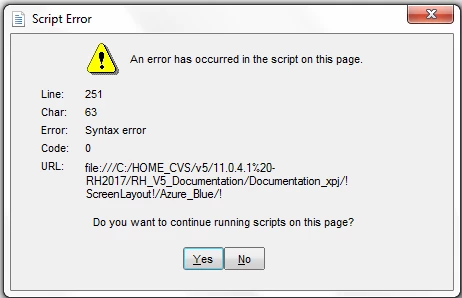
This happens with any layout. 

I have 14 days left of a trial I can't use. Has anyone had this problem?

This topic has been closed for replies.
Correct answer JGaf10311788

How does Employee Care work in IE11, Firefox 56.0 and Chrome 62.0.3702.75?

Key to this is knowing how a sample project works in the latest versions. Click Open on the RoboHelp Starter page and then click Samples in the ribbon on the left. Please use Employee Care rather than you own project as that is a known quantity.

Note that without a pending fix from Adobe, search will not work in IE11. If that proves to be the only issue, there is a temporary fix but let's leave that until we know all else is working.


See www.grainge.org for RoboHelp and Authoring information

@petergrainge


Tech support provided me with a new loadprojdata.js file.  I was told there is/was a compatibility issue with the .js file responsible for loading contents on Internet Explorer.  I added this file to my seed files, and subsequent projects seem to function correctly.

I'm just gonna cross my fingers and hope I don't stumble upon an issue I hadn't noticed.......

3 replies

wmorrison81
Participant
December 12, 2017

I am having a similar issue with loadprojdata.js.  It appears that RoboHelp 2017 generates a loadprojdata.js file which attempts to utilize ES6 arrow function syntax which IE11 can not parse. Line 251

          rh.model.subscribe(rh.consts('KEY_TOC_ORDER'), (orderData) => {

This needs changed to

          rh.model.subscribe(rh.consts('KEY_TOC_ORDER'), function(orderData) {

Is there a way to change the loadprojdata.js file so that when new user guides are generated that it generates a compatible file?

Jeff_Coatsworth
Community Expert
Community Expert
December 12, 2017

@wmorrison81 - if you know what you need to tweak in that js file, you can always modify the "seed" files found in your c:\program files etc folder (just make a backup of the "factory" one found in there)

Peter Grainge
Community Expert
Community Expert
January 12, 2018

Please see Item 13 in Using RoboHelp 2017 for information about a fix for the issue of responsive help failing to load.


See www.grainge.org for free RoboHelp and Authoring information.

@petergrainge

Use the menu (bottom right) to mark the Best Answer or Highlight particularly useful replies. Found the answer elsewhere? Share it here.
AJIT_M
Community Manager
Community Manager
November 9, 2017

Hi There,

I have sent you a private message. Kindly check your inbox and let me know if any further help is required.

Regards,

Ajit

doctester
Participating Frequently
November 9, 2017

Hi All,

For the benefit of anyone else running into this or similar problems with Responsive HTML5 in IE11, I wanted to report back on my experience with the fix. To get the context right, my issue was that content wasn't rendering in IE11.

Using the information provided by JGaf, I sent an email to tcssup@adobe.com. I received a response from Pankaj Kumar in Adobe support in less than half an hour with pointers to replacement loadparentdata.js and loadprojdata.js files (Note that I was sent two files rather than just loadprojdata.js.) . Replacing these in \template\scripts solved the problem, and my help project now displays correctly in IE11.

I also wanted to add some debugging notes:

  • When I first replaced the files the help displayed correctly in IE11 when I opened it from index.htm.
  • It did not display correctly when called from my company's application. I also got a debug message telling me that initAndCollectAllChildPaths (a global variable) is undefined. This is the same message I was getting before I replaced the files.
  • After trying a variety of other fixes, I cleared my browser cache, and everything worked fine. So clearing the cache might be mandatory to take advantage of the fix.

Thanks much to JGaf for the pointer to the solution and Pankaj Kumar for providing it. This definitely makes for a productive day.

Peter Grainge
Community Expert
Community Expert
November 9, 2017

Those are the files I was pointing to, for the benefit of anyone else

coming to this thread.

@jgaf Were you sent one or two files? If one only, that could explain things.

Use the menu (bottom right) to mark the Best Answer or Highlight particularly useful replies. Found the answer elsewhere? Share it here.
Captiv8r
Legend
October 20, 2017

Hi there

Updates often update the layouts.

I would suggest creating a new SSL, then ensuring you point at the layout you want so it is copied fresh. Don't point at an existing layout. Give that a try and see if it helps.

Cheers... Rick

Inspiring
October 20, 2017


No, thank you for the quick response, but that didn't work.

I created a new SSL and pointed to the Indigo layout, same issue with nothing displaying in the context pane,  and interestingly enough my index levels are STILL incorrect (all at the top level). The bookmarks on the skin itself also don't work (but that was existing prior to the update, which was also supposed to be fixed in this update).

Also, I still get a script error when I just try to preview any of my screen layouts...not clicked from within any SSL, just clicking on it layout directly from the output pod.

What else can I do?  Can I download another trial to start over??

Updated to add:  Its as if the only evidence that I actually did perform an update is getting the script error.  And, yes, I confirmed that RH displays: 13.02.334. The issues I wanted to fix are not corrected.

Peter Grainge
Community Expert
Community Expert
October 24, 2017

Two things.

First, the script error is something I am seeing from Preview but the layout works fine when generated.

Second, create a dummy project with a handful of new topics (nothing imported) and see if that is OK.


See www.grainge.org for RoboHelp and Authoring information

@petergrainge

Use the menu (bottom right) to mark the Best Answer or Highlight particularly useful replies. Found the answer elsewhere? Share it here.