


Inspiring
June 3, 2021
Question

RoboHelp 2017 won't display topics in Design view

  • June 3, 2021
  • 4 replies
  • 304 views

I have a quirk that I cannot understand and, at the moment, I can't resolve.


Most of the time I can edit topics in RH 2017 without any trouble but occassionally when I attempt to edit a topic, RoboHelp displays the container in Design view but it's totally devoid of any content:
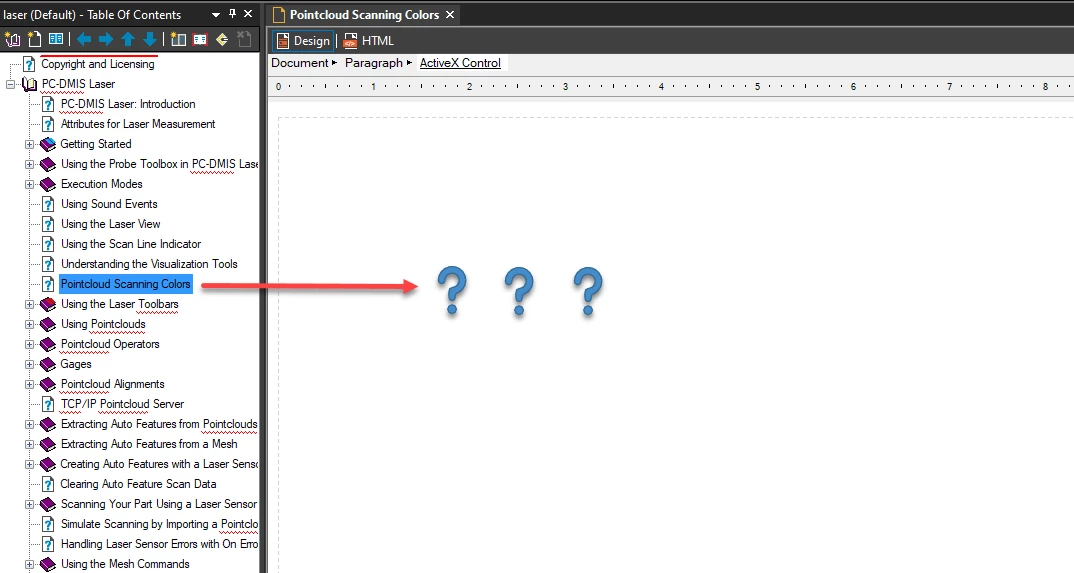


This time however it appears to be stuck in this mode.


I can view the code if I switch to HTML view and I can preview the topic (Ctrl + W) without any trouble but the Design view will just not display the topic for editing.


I've tried restarting RoboHelp, restarted my laptop and verified that I'm updated to the latest version of RH without any luck.


If anyone has any thoughts on what I should try next please let me know ... this is very frustrating when it occurs as any author would know.


Thanks!

    This topic has been closed for replies.

    4 replies

    Peter Grainge
    Community Expert
    Community Expert
    June 18, 2021

    Could be your machine but nothing I can do to help on that. Maybe uninstall and reinstall?

    ________________________________________________________
    See www.grainge.org for free Authoring and RoboHelp Information

    Use the menu (bottom right) to mark the Best Answer or Highlight particularly useful replies. Found the answer elsewhere? Share it here.
    SGRoehAuthor
    Inspiring
    June 18, 2021

    Thanks Peter - After my last post and considering your thoughts, I'm thinking the same thing.

    Peter Grainge
    Community Expert
    Community Expert
    June 18, 2021
    1. Always the same topics?
    2. Have you tried rebooting when this happens?
    3. Project is on your local drive, not a network?

    ________________________________________________________
    See www.grainge.org for free Authoring and RoboHelp Information

    Use the menu (bottom right) to mark the Best Answer or Highlight particularly useful replies. Found the answer elsewhere? Share it here.
    SGRoehAuthor
    Inspiring
    June 18, 2021
    1. No and Yes - Any topic I open - no matter from which RH project when this occurs - shows this issue. If I open a topic, close it and then reopen the same topic it still doesn't diplay the content in the Design view. All the code displays fine in HTML view, the issue is that nothing displays in Design view when this issue occurs.
    2. I just rebooted my PC and now the content displays in Design view as expected. It may be that something's amiss in the Window's registry perhaps that causes this?
    3. Yes, all my projects are pulled locally from my machine's hard drive.
    Community Expert
    June 3, 2021

    The "Activex Control" tag in the tag breadcrumbs at the top of the topic is unusual. Often it indicates a video or some other interactive content. While I know no video is displaying, do you see the content you expect if you scroll down the page?

    SGRoehAuthor
    Inspiring
    June 18, 2021

    Hi Amebr -Thank you for responding and I apologize for the lateness of my response.

    No, it doesn't matter which topic I open or from which RH project I open them from when this occurs.

    I don't think the ActiveX Control tag is the issue as you can see from this image, I'm at what's supposed to be the Heading 2 tag:


    Peter Grainge
    Community Expert
    Community Expert
    June 3, 2021

    Not something that is ringing any bells. If you open topics from Project Manager, do you have the same problem?

    ________________________________________________________
    See www.grainge.org for free Authoring and RoboHelp Information

    Use the menu (bottom right) to mark the Best Answer or Highlight particularly useful replies. Found the answer elsewhere? Share it here.
    SGRoehAuthor
    Inspiring
    June 18, 2021

    Hi @Peter Grainge - Sorry about the late response...

    Topics that I open from the Project Manager open the same way when this problem occurs - as it is doing this morning...ugh!

    The issue hasn't occurred since my original posting but all of a sudden it's back.