
dash1138
Known Participant
September 30, 2020
Question

Robohelp 2017 "You project file... is corrupt and cannot be opened. Try Deleing this file"

  • September 30, 2020
  • 4 replies
  • 237 views

Hello, 


I am getting a message when I open my project in Robohelp 2017
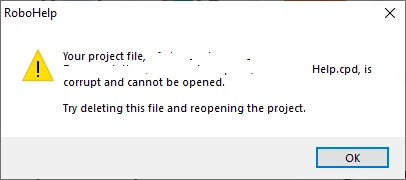
 

I have seen posts stating that I can try to create a backup then delete the .cpd file and re-open the project. I was wondering, is there any downside to this? Will this work in Robohelp 2017? I was also wondering, is there a known cause for this happening? 


I appreciate any help. Thank you. 

    This topic has been closed for replies.

    4 replies

    Peter Grainge
    Community Expert
    Community Expert
    October 1, 2020

    I've also done it using something like Google Drive syncing locally. It works fine as long as you time allocate access times and allow Google Drive to update locally after you boot up and before you start work. In this scenario the other person would be sleeping while I worked because of time zones.


    Use the menu (bottom right) to mark the Best Answer or Highlight particularly useful replies. Found the answer elsewhere? Share it here.
    Jeff_Coatsworth
    Community Expert
    Community Expert
    October 1, 2020

    If you don't have multiple authors working on the project then you don't need source control or having it located on the network. A simple batch file to back it up off your c:\ drive to a network location is fine. I've recently worked with another writer over in Pakistan where we "hot potatoed" the project back and forth for authoring (just by zipping it up & maintaining the same folder structure on both our local machines). Worked fine.

    Peter Grainge
    Community Expert
    Community Expert
    September 30, 2020

    The issue with projects on network in Classic versions of RoboHelp is they are only as good as the network. If the network is slow or if there is some sort of glitch, then you can have problems. I'm not saying that is the issue, just that it could be.


    I would move the project locally, delete the CPD or set RoboHelp to do that, then see what happens.


    Use the menu (bottom right) to mark the Best Answer or Highlight particularly useful replies. Found the answer elsewhere? Share it here.
    Jeff_Coatsworth
    Community Expert
    Community Expert
    September 30, 2020

    You don't really need to backup before deleting the .cpd file - there's even a setting inside RH to clear it each time you open the project. It's just an Access database file that keeps track of stuff in your project. If it's missing, it gets rebuilt automatically.
    As to why it got corrupted, have a look at where the project is located - is it on a local c:\ drive or network location? Are you using any source control for checking the project in/out?

    dash1138
    dash1138Author
    Known Participant
    September 30, 2020

    Thank you very much, Jeff. I appreciate your help. I found a recommendation on Peter Grainge's website about the setting you mentioned.


    Our project is on a network drive. We don't have source control in place. Could that cause this issue?


    I appreciate your help. Thank you.