

Community Expert
February 6, 2020
Question

RoboHelp 2019.0.11 messes up imported graphics from FrameMaker
  • February 6, 2020
  • 4 replies
  • 391 views

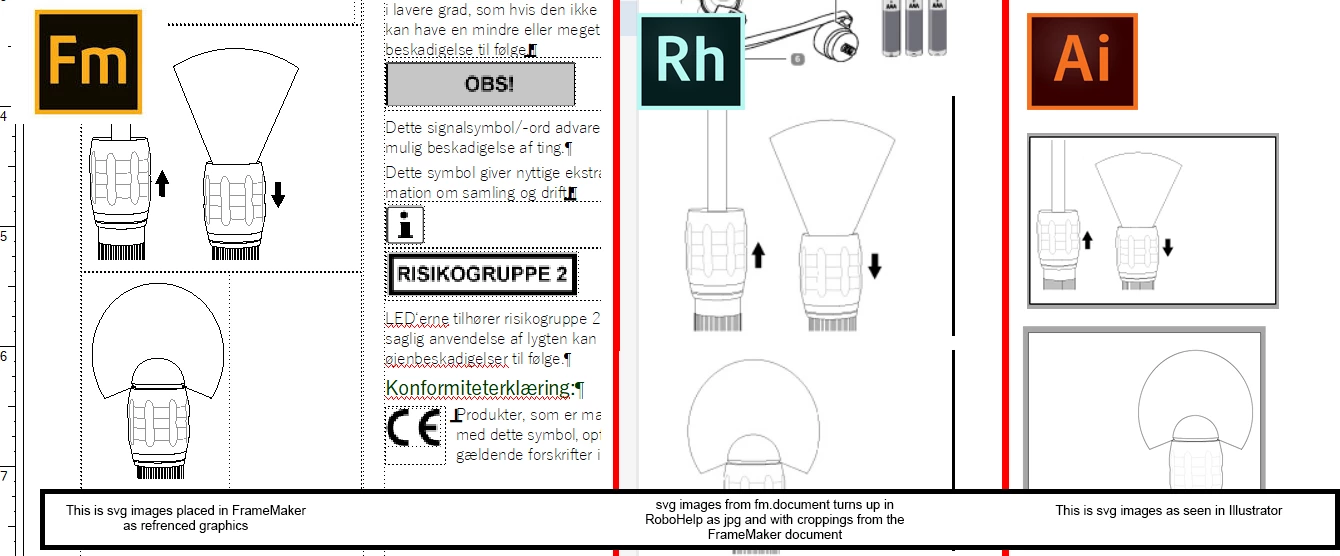
I am trying to import FrameMaker documents into RoboHelp, but the results are not so good. While some it works fine - like breaking down into topics - other things seems shaky. My FrameMaker document holds a bunch of svg files which have been imported by reference. When I import that document into Robohelp, the svg files have become jpg files. There is an import option which should allow the referenced graphics from the FrameMaker document to stay in their original format, but I can't make it work. Jpg files is what I get, no matter what option I choose. But not only that. The jpg files have been cropped as per their cropping in the FrameMaker document and not per their original dimensions.

Am I just confused or mistaken here or is this a bug?


This topic has been closed for replies.

4 replies

Jeff_Coatsworth
Community Expert
Community Expert
February 7, 2020

FM has that same ability to paginate (break up content into separate topics based on paragraph tags) as RH does (most of the "engine" that does it inside FM is actually RH!).

Community Expert
February 6, 2020

I can publish as html5 out of FrameMaker and have it use mys svg files. Only I wanted to use RoboHelps ability to split the document up into topics and I want to use RoboHelp 2019.

Bjørn Smalbro - FrameMaker.dk
Peter Grainge
Community Expert
Community Expert
February 6, 2020

Jeff's reply has rung a bell. Try searching my site and this forum.


Post back and if you could not find it, I'll dig around my notes.


Use the menu (bottom right) to mark the Best Answer or Highlight particularly useful replies. Found the answer elsewhere? Share it here.
Jeff_Coatsworth
Community Expert
Community Expert
February 6, 2020

I'd try a test with the Classic version of RH2019 to see how it's behaving. In previous versions there was something in the import parameters that dealt with images and their sizing - something to do with leaving the dimension settings at zero. What's your final output going to be? Have you tried publishing straight out of FM?