
michellef1266897
Known Participant
May 29, 2019
Question

RoboHelp 2019 adds table borders at import

  • May 29, 2019
  • 2 replies
  • 378 views

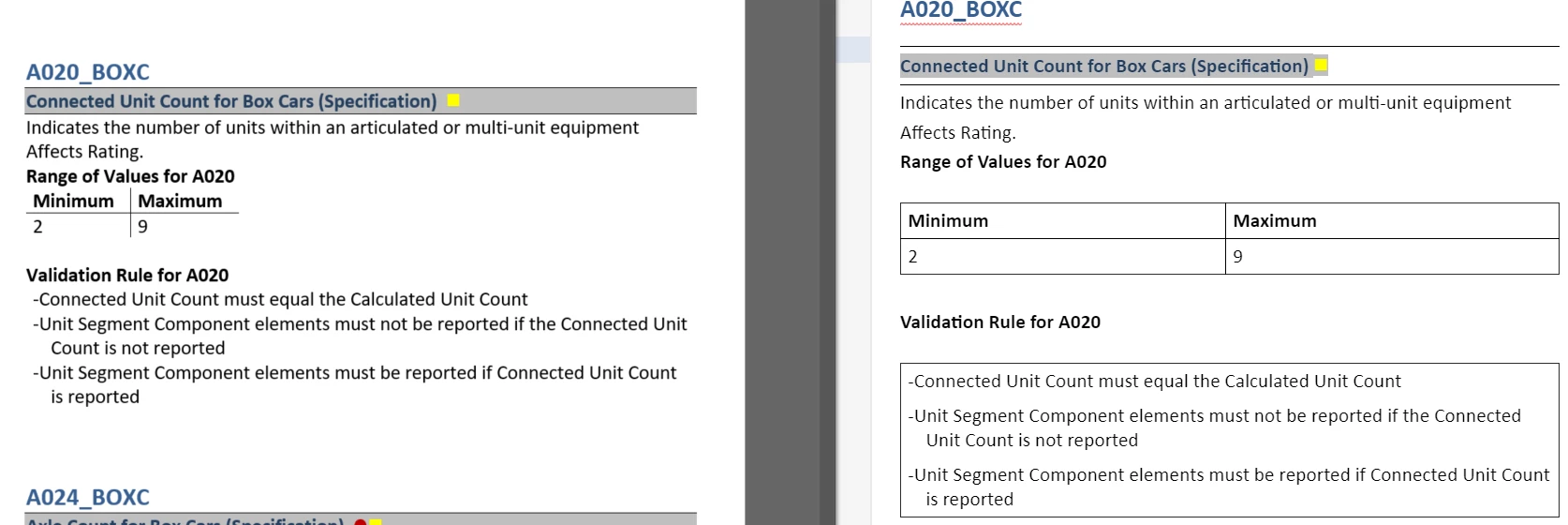
Also I've noticed that all our tables have borders when the large file is imported into RoboHelp 2019, even though the borders are not in the Word file. What do I need to do to fix this?  I've played around with the import settings and haven't been able to get it to import correctly.  (Word doc on the left and RoboHelp 2019 import on the right).  We have over 2000 topics in this large file, so don't want to have manually remove every border.  I've checked the box to import inline styles so that we get all our styles.
    This topic has been closed for replies.

    2 replies

    Peter Grainge
    Community Expert
    Community Expert
    September 16, 2019

    The later posts in this thread are lost in the forum transition. I just wanted to let anyone know that the issues for borderless tables having borders added during import will hopefully be fixed in the next update.


    See www.grainge.org for free RoboHelp and Authoring information.

    @petergrainge


    Use the menu (bottom right) to mark the Best Answer or Highlight particularly useful replies. Found the answer elsewhere? Share it here.
    Peter Grainge
    Community Expert
    Community Expert
    May 29, 2019

    Please create a simple Word doc and test it happens with that. The text doesn't matter if it is confidential stuff.

    See the Contact page on my site and send the project and the Word document as instructed there. Do make sure you include a link to this thread and please do not email the project direct.


    See www.grainge.org for free RoboHelp and Authoring information.

    @petergrainge

    Use the menu (bottom right) to mark the Best Answer or Highlight particularly useful replies. Found the answer elsewhere? Share it here.