
Participant
September 7, 2018
Question

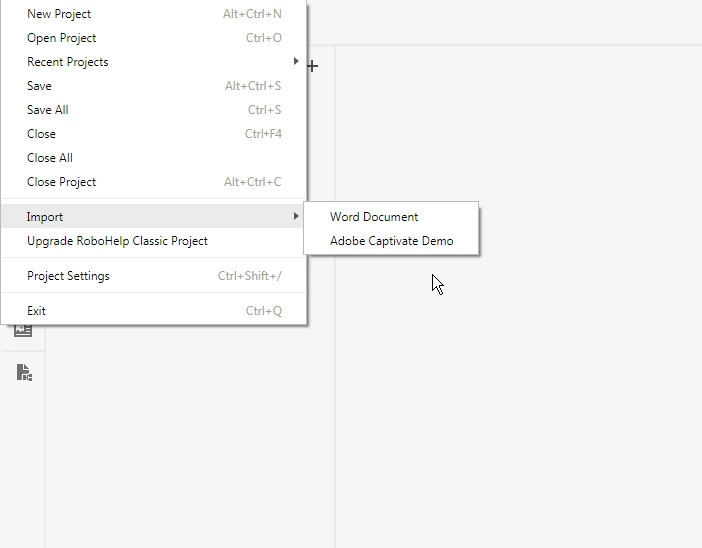
RoboHelp 2019 is missing a Framemaker import option

  • September 7, 2018
  • 1 reply
  • 1023 views

I recently upgraded from having separate RoboHelp and FrameMaker products (2017 version) to the TCS suite (2019 version). I've been able to use FrameMaker 2019 no problem, but when I attempted to import my document from RoboHelp, I can no longer see a FrameMaker import option. The only options available in the Import menu are Word and Captivate. I've looked up the import instructions for importing a FrameMaker document and they are the same for RH 2019 as they have been. Does this mean my RoboHelp install is defective? Below is a screenshot of my File menu with the import options.
This topic has been closed for replies.

1 reply

norasmartAuthor
Participant
September 7, 2018

I answered my own question (sort of). The above is a screenshot of RoboHelp 2019. I was able to import my FrameMaker file using RoboHelp 2019 classic.

I'm still a little confused by RoboHelp 2019, but I am signed up for the training so will figure it out then.

Ioana_St
Inspiring
September 8, 2018

The current version is missing a ton of features that are available in the Classic version. I recommend waiting for the first updates and seeing what they add back.

Participating Frequently
September 10, 2018

I agree. The features of "Create Browsing Sequence" and "Create Windows" are also missing in Adobe RoboHelp 2019. Now, I am figuring out to move from Adobe RoboHelp 2019 to Adobe RoboHelp Classic 2019.